| desktop-application |
org.gimp.GIMP.Stable |
| kab |
lv |
pt |
sr-Latn |
tr |
tt |
csb |
id |
ast |
zh-Hans-CN |
el |
en-CA |
ar |
eo |
en-GB |
es |
et |
mk |
ml |
eu |
it |
is |
mr |
ca-valencia |
uk |
bs-Latn |
fa |
my |
bg |
be-Cyrl |
ja |
zh-Hant-HK |
fi |
pt-BR |
nb |
br |
ne |
fr |
bn |
nl |
nn |
vi |
ro |
ca |
zh-Hant-TW |
ru |
gd |
ka |
sr-Cyrl |
gl |
nds |
oc |
cs |
km |
kn |
ko |
gu |
si |
sk |
sl |
C |
ky |
da |
de |
sv |
he |
pa |
ta |
hr |
te |
hu |
pl |
th |
dz |
lt |
| Ahil GNU i wesqerdec n tugna |
GNU attēlu apstrādes programma |
Programa de Manipulação de Imagens GNU |
Gnuov program za obradu slika |
GNU Görüntü İşleme Programı |
Sürät Eşkärtüçe GNU-Yasılım |
Editora òbrôzów GIMP |
GNU Program Manipulasi Gambar |
Programa de Manipulación d'Imaxe GNU |
GNU 图像处理程序 |
Πρόγραμμα επεξεργασίας εικόνων GNU |
GNU Image Manipulation Program |
برنامج جنو لمعالجة الصور |
Bildmanipulilo (GIMP = GNU Image Manipulation Program) |
GNU Image Manipulation Program |
Programa de manipulación de imágenes de GNU |
GIMP - GNU pilditöötlusprogramm |
ГНУ програма за манипулација со слики |
GNU Image Manipulation Program |
Irudiak Manipulatzeko GNU Programa |
GNU Image Manipulation Program |
GNU myndvinnsluforritið |
गिम्प - मराठी |
Programa de retoc d'imatges de GNU |
GNU Image Manipulation Program |
Gnuov program za obradu slika (GNU Image Manipulation Program) |
برنامهٔ روتوش تصویر گنو |
GNU ရုပ်ပုံ စီမံကိုင်တွယ်ရေး ပရိုဂရမ် |
Редактор на изображения на GNU (GIMP) |
GNU Image Manipulation Program |
GIMP (GNU Image Manipulation Program) |
GNU 圖片處理程式 |
GIMP-kuvankäsittely |
Programa de manipulação de imagem do GNU |
GNU bildebehandlingsprogram |
Goulev da zornata skeudennoù GNU |
जी एन यू छवि परिचालन कार्यक्रम |
Éditeur d’image GIMP |
GNU ছবি দক্ষতা সহকারে ব্যবহারের কার্যক্রম |
GNU Image Manipulation Program |
GNU bilethandsamingsprogram |
Chương trình xử ký ảnh GNU |
GIMP |
Programa de retoc d'imatges de GNU |
GNU 影像處理程式 |
GNU Image Manipulation Program |
GNU Image Manipulation Program |
GNU Image Manipulation Program |
Гнуов програм за обраду слика |
Programa de Manipulación de Imaxes de GNU |
GNU Billbewarkenprogramm |
Editor d'imatge GIMP |
GNU Image Manipulation Program |
កម្មវិធីរៀបចំរូបភាពរបស់ GNU |
GNU ಇಮೇಜ್ ಮ್ಯಾನಿಪುಲೇಶನ್ ಪ್ರೊಗ್ರಾಮ್ |
그누 이미지 처리 프로그램 |
GNU ચિત્ર જાળવણી કાર્યક્રમ |
GNU Image Manipulation Program |
GNU program na manipuláciu s obrázkami |
GIMP – program GNU za obdelavo slik |
GNU Image Manipulation Program |
GNU Image Manipulation Program |
GNU Image Manipulation Program |
GNU Image Manipulation Program |
GNU:s bildmanipuleringsprogram |
תוכנת עיבוד התמונה של GNU |
ਗਨੂ ਈਮੇਜ਼ ਮੈਨੂਪਲੇਸ਼ਨ ਪਰੋਗਰਾਮ |
க்னூ பட கையாளல் நிரல் |
GIMP program za manipulaciju slikama |
గ్నూ ఇమేజ్ మానిప్యులేషన్ ప్రోగ్రామ్ |
GNU képszerkesztő program |
Edytor obrazów GIMP |
GNU Image Manipulation Program |
་་ཨི་མེཇི་་མ་ནུ་པུ་ལེ་ཤཱན་་པོརོ་གརམ། |
GNU paveikslėlių manipuliavimo programa |
|
| kab |
lv |
pt |
sr-Latn |
tr |
ast |
id |
zh-Hans-CN |
en-CA |
el |
ar |
eo |
en-GB |
es |
et |
eu |
mk |
is |
it |
bs-Latn |
mr |
ca-valencia |
uk |
fa |
my |
bg |
ja |
zh-Hant-HK |
fi |
pt-BR |
nb |
br |
ne |
fr |
bn |
nl |
nn |
ca |
ro |
vi |
zh-Hant-TW |
gd |
ka |
sr-Cyrl |
ru |
gl |
oc |
cs |
km |
kn |
ko |
gu |
sk |
sl |
C |
da |
de |
sv |
pa |
ta |
kk-Cyrl |
hr |
te |
hu |
dz |
pl |
be-Cyrl |
lt |
| Snulfu-d tugniwin yerna ẓreg tiwlafin |
Veido attēlus vai rediģē fotogrāfijas |
Criar imagens e editar fotografias |
Napravite nove sličice i sredite vaše fotografije |
Görüntü oluşturur ve fotoğraf düzenler |
Crea imáxenes y edita semeyes |
Buat gambar dan sunting foto |
创建图像或编辑照片 |
Create images and edit photographs |
Δημιουργία εικόνων και επεξεργασία φωτογραφιών |
أنشئ صورا وحرّر لقطات |
Krei bildojn aŭ redakti fotaĵojn |
Create images and edit photographs |
Cree imágenes y edite fotografías |
Joonistamine ja fotode töötlemine |
Sortu irudiak eta editatu argazkiak |
Направи слики и уреди фотографии |
Búa til myndir og breyta ljósmyndum |
Creazione immagini e modifica fotografie |
Napravite slike i obradite fotografije |
प्रतिमा तयार करा आणि छायाचित्रे संपादित करा |
Creeu imatges i editeu fotografies |
Створення зображень та редагування фотографій |
ایجاد تصاویر و ویرایش عکسها |
ရုပ်ပုံများကို ဖန်တီးပြီး ဓါတ်ပုံများကို တည်းဖြတ်ပါ |
Създаване на изображения и редакция на снимки |
画像の作成と写真の編集を行います |
建立圖像與編輯照片 |
Luo kuvia ja muokkaa valokuvia |
Crie e edite imagens ou fotografias |
Lag bilder og rediger fotografier |
Krouiñ hag embann skeudennoù pe luc'hskeudennoù |
छवि सिर्जना गर्नुहोस् र फोटोग्राफ सम्पादन गर्नुहोस् |
Créer des images et modifier des photographies |
ছবি তৈরি করুন এবং ফটোগ্রাফ সম্পাদন করুন |
Bewerk foto's en maak afbeeldingen aan |
Lag bilete og rediger foto |
Creeu imatges i editeu fotografies |
Creează imagini și editează fotografii |
Tạo và chỉnh sửa ảnh |
製作影像與編輯照片 |
Cruthaich dealbhan is deasaich dealbhan camara |
შექმენით გამოსახულებები და ჩაასწორეთ ფოტოგრაფიები |
Направите нове сличице и средите ваше фотографије |
Создание изображений и редактирование фотографий |
Crear imaxes e editar fotografías |
Crear d'imatges e modificar de fotografias |
Vytvářejte obrázky a upravujte fotografie |
បង្កើតរូបភាព និង កែសម្រួលរូបថត |
ಚಿತ್ರಗಳನ್ನು ರಚಿಸಿ ಹಾಗು ಫೋಟೋಗ್ರಾಫ್ಗಳನ್ನು ಸಂಪಾದಿಸಿ |
이미지를 만들고 사진을 편집합니다 |
ચિત્રો બનાવો અને ફોટાઓમાં ફેરફાર કરો |
Vytvárajte a upravujte obrázky alebo fotografie |
Ustvari slike in uredi fotografije |
Create images and edit photographs |
Opret billeder og redigér fotografier |
Bilder erstellen und Fotografien bearbeiten |
Skapa bilder och redigera fotografier |
ਚਿੱਤਰ ਬਣਾਓ ਅਤੇ ਤਸਵੀਰਾਂ ਸੋਧੋ |
பிம்பங்களை உருவாக்கவும் மற்றும் படங்களை திருத்தவும் |
Суреттерді жасау және фотоларды түзету |
Stvarajte slike i uređujte fotografije |
బొమ్మలను సృష్టించు మరియు చిత్రాలను సవరించు |
Képek létrehozása és fotók szerkesztése |
གཟུགས་བརྙན་ཚུ་ གསར་བསྐྲུན་འབད་ནི་དང་ དཔར་ཚུ་ཞུན་དག་འབད། |
Tworzenie oraz obróbka obrazów i fotografii |
Стварэнне відарысаў і рэдагаванне фатаграфій |
Kurti paveikslėlius ir redaguoti fotografijas |
|
| ja |
sk |
sl |
be-Cyrl |
C |
uk |
fr |
pt-BR |
sv |
ca |
en-GB |
hu |
hr |
zh-Hant-TW |
nl |
nn |
lt |
ar |
pl |
lv |
bs-Latn |
el |
ca-valencia |
ast |
eo |
ka |
pt |
gl |
gd |
es |
vi |
eu |
ro |
ru |
tr |
sr-Latn |
ko |
it |
is |
de |
zh-Hans-CN |
fa |
bg |
mr |
sr-Cyrl |
fi |
da |
| <p>GIMP (GNU Image Manipulation Program) は、フォトレタッチ、画像合成、画像オーサリングといった作業を行うための、自由に配布できるプログラムです。</p> |
<p>GIMP je skratka pre GNU Image Manipulation Program. Je to voľne šíriteľný program na retušovanie fotografií, vytváranie a autorizovanie obrázkov.</p>
<p>Disponuje mnohými možnosťami. Môže byť použitý ako jednoduchý kresliaci program, profesionálny program na retušovanie fotografií, internetový dávkový systém na spracovanie fotografií, vykresľovač obrázkov hromadnej výroby, konvertor formátov obrázkov, atď.</p>
<p>GIMP je nepostrádateľný a rozšíriteľný. Je navrhnutý s rozšíreniami pomocou zásuvných modulov a rozšírení, ktoré dokážu vykonať takmer čokoľvek. Pokročilé rozhranie jednoducho ovládateľné pomocou skriptov vám umožňuje vykonať všetko od najľahšej úlohy až po tie najzložitejšie manipulačné procedúry. Program GIMP je dostupný pre systémy Linux, Microsoft Windows a OS X.</p> |
<p>GIMP je okrajšava polnega angleškega imena, GNU Image Manipulation Program. Je prosto dostopen program, namenjen retuši fotografij, tvorbi in avtorstvu slik.</p>
<p>Ima veliko zmogljivih funkcij. Uporabite ga lahko kot enostavni program za risanje, kot strokovno kakovosten program za retušo fotografij, spletni sistem za paketno obdelavo, masovni upodobljevalnik slik, pretvornik med slikovnimi zapisi itn.</p>
<p>GIMP je razširljiv. Zasnovan je tako, da ga je mogoče dopolnjevati z vtičniki in razširitvami, da zmore pravzaprav vse. Napredni vmesnik skriptanja omogoča skriptanje vsega, od najenostavnejših nalog do najkompleksnejših procedur obdelave slik. GIMP je na voljo tudi za sisteme Microsoft Windows in OS X.</p> |
<p>GIMP - гэта абрэвіятура ад GNU Image Manipulation Program. Гэта свабоднае праграмнае забеспячэнне для рэтушавання фатаграфій і сумяшчэння відарысаў, а таксама для стварэння ўласных відарысаў.</p>
<p>Праграма мае шмат магчымасцей. У ёй можна проста маляваць, а можна выконваць якаснае рэтушаванне фатаграфій на прафесійным узроўні. Акрамя гэтага, яна з'яўляецца сістэмай пакетнай апрацоўкі ў сетцы, сродкам масавай візуалізацыі відарысаў, праграмай пераўтварэння відарысаў у розныя фарматы, а таксама мае іншыя прафесійныя магчымасці.</p>
<p>Магчымасці праграмы GIMP можна без намаганняў дапоўніць пры дапамозе ўбудоў і пашырэнняў. Дзякуючы гэтаму, магчыма выкананне практычна любых задач. Перадавы інтэрфейс для распрацоўкі сцэнарыяў дазваляе лёгка аўтаматызаваць выкананне як самых простых задач, так і самых складаных працэдур апрацоўкі відарысаў. Праграма GIMP даступна для Linux, Microsoft Windows і OS X.</p> |
<p>GIMP is an acronym for GNU Image Manipulation Program. It is a
freely distributed program for such tasks as photo retouching,
image composition and image authoring.</p>
<p>It has many capabilities. It can be used as a simple paint
program, an expert quality photo retouching program, an online
batch processing system, a mass production image renderer, an
image format converter, etc.</p>
<p>GIMP is expandable and extensible. It is designed to be
augmented with plug-ins and extensions to do just about
anything. The advanced scripting interface allows everything
from the simplest task to the most complex image manipulation
procedures to be easily scripted. GIMP is available for Linux,
Microsoft Windows and OS X.</p> |
<p>GIMP – це абревіатура від GNU Image Manipulation Program (програма GNU для маніпулювання зображеннями). Це вільно розповсюджувана програма для таких завдань, як ретушування фотографій, компонування та створення зображень.</p>
<p>Вона має багато можливостей. Її можна використати як простеньку програму для малювання, як програму ретушування високоякісних фотографій, як інтернет-систему пакетної обробки, як відтворювач масових зображень, як перетворювач між різними графічними форматами тощо.</p>
<p>GIMP легко розбирається і розширюється. Вона розроблена, щоби через доповнення модулями і розширеннями робити усе, що завгодно. Додатковий інтерфейс сценаріїв дозволяє легко запрограмувати усе від найпростіших завдань до найскладніших процедур обробки зображень. GIMP доступний для Linux, Microsoft Windows та OS X.</p> |
<p>GIMP est l’acronyme de GNU Image Manipulation Program. C’est un programme libre destiné à des tâches comme la retouche de photographies, la composition et la création d’images.</p>
<p>Ses capacités sont très nombreuses. On peut s’en servir comme d’un simple programme de peinture, d’un programme expert de retouche photo, d’un système de traitement par lots en ligne, d’un convertisseur de format d’image, etc.</p>
<p>GIMP est extensible. Il est prévu pour être complété par des extensions appelées greffons qui lui permettent de réaliser à peu près tout. l’interface avancée de script offre la possibilité d’effectuer facilement depuis la plus simple tâche jusqu’aux procédures de manipulation d’image les plus complexes. GIMP est disponible pour Linux, Microsoft Windows et OS X.</p> |
<p>GIMP é um acrônimo para GNU Image Manipulation Program. Ele é um programa distribuído livremente para tarefas como retoque de fotos, composição e criação de imagens.</p>
<p>O GIMP possui muitas capacidades. Ele pode ser usado como um programa de pintura simples, como um programa de retoque de fotos semiprofissional, como um sistema de processamento de imagens em massa online, como um renderizador de imagens em massa, como um conversor de arquivos de imagem, etc.</p>
<p>O GIMP é expansível e extensível. Ele foi projetado para ser ampliado com plug-ins e extensões e fazer qualquer coisa. A interface avançada de scripts permite desde tarefas simples até os mais complexos processos de manipulação de imagens em scripts. O GIMP é compatível com Linux, Microsoft Windows e OS X.</p> |
<p>GIMP är en akronym för GNU Image Manipulation Program. Det är ett fritt distribuerat program för sådana uppgifter som fotoretuschering, bildkomposition och bildskapande.</p>
<p>Det har många funktioner. Det kan användas som ett enkelt ritprogram, ett fotoretuscheringsprogram på expertnivå, ett online massbearbetningssystem, en massproduktionsbildåtergivare, en bildformatsomvandlare, etc.</p>
<p>GIMP är utbyggbart och tänjbart. Det är avsett att kompletteras med insticksprogram och tillägg för att göra nästan vad som helst. Det avancerade skriptgränssnittet tillåter allt från den enklaste uppgift till de mest komplexa bildmanipuleringsförfaranden att enkelt skrivas. GIMP är tillgängligt för Linux, Microsoft Windows och OS X.</p> |
<p>El GIMP és l'acrònim de GNU Image Manipulation Program (Programa de retoc d'imatges GNU). És un programa que es distribueix de manera lliure per a tasques com el retoc de fotografies, la composició i la creació d'imatges.</p>
<p>Té moltes funcionalitats. Pot utilitzar-se com a un programa simple de dibuix, com una aplicació professional de retoc fotogràfic, com un sistema en línia de processament per lots, per a renderitzar imatges de forma massiva, per a convertir imatges entre formats, etc.</p>
<p>El GIMP és ampliable i extensible. Està dissenyat per a ampliar-se amb connectors i extensions, per a fer-hi gairebé de tot. La interfície avançada de scripts permet fer un script per a qualsevol cosa, des de la tasca més simple als processos més complexos de manipulació d'imatges. El GIMP està disponible per a Linux, Microsoft Windows i OS X.</p> |
<p>GIMP is an acronym for GNU Image Manipulation Program. It is a freely distributed program for such tasks as photo retouching, image composition and image authoring.</p>
<p>It has many capabilities. It can be used as a simple paint program, an expert quality photo retouching program, an online batch processing system, a mass production image renderer, an image format converter, etc.</p>
<p>GIMP is expandable and extensible. It is designed to be augmented with plug-ins and extensions to do just about anything. The advanced scripting interface allows everything from the simplest task to the most complex image manipulation procedures to be easily scripted. GIMP is available for Linux, Microsoft Windows and OS X.</p> |
<p>A GIMP a GNU Image Manipulation Program rövidítése. Ez egy szabadon terjesztett program fényképretusálás, képösszeállítás és képszerkesztési feladatokhoz.</p>
<p>Számos képességgel rendelkezik. Használható egyszerű rajzprogramként, profi minőségű fényképretusáló programként, online kötegelt feldolgozó rendszerként, tömeggyártó kép renderelőként vagy akár képformátum átalakítóként, stb.</p>
<p>A GIMP kiegészíthető és bővíthető. Úgy tervezték, hogy bővíthető legyen bővítményekkel és kiegészítőkkel, amikkel szinte minden meg lehet csinálni. A speciális parancsfájlfelület lehetővé tesz mindent a legegyszerűbb feladatoktól kezdve a legkomplexebb képmanipulációs eljárásokig egyszerű parancsfájlokkal. A GIMP elérhető Linux, Microsoft Windows és OS X rendszerekre is.</p> |
<p>GIMP je skraćenica za GNU Image Manipulation Program (program za manipulaciju slikama). Program se slobodno distribuira za zadatke poput retuširanja fotografija, oblikovanje i stvaranje slika.</p>
<p>Ima mnogo mogućnosti. Može se koristiti kao jednostavan program za slikanje, stručni program za kvalitetno retuširanje fotografija, skupni mrežni sustav obrade, prikaz slika za masovnu proizvodnju, pretvorbu formata slike, itd.</p>
<p>GIMP ima proširive mogućnosti. Dizajniran je tako da se može proširiti priključcima i proširenjima kako bi mogao učiniti gotovo sve. Napredno sučelje skriptiranja omogućuje sve od najjednostavnijeg zadatka do najsloženijih postupaka manipulacije slikom u svrhu olakšavanja skriptiranja. GIMP je dostupan za Linux, Microsoft Windows i OS X.</p> |
<p>GIMP 代表「GNU 影像處理程式」(GNU Image Manipulation Program) 的縮寫,這是款可用於修圖、影像合成與創作的自由軟體。</p>
<p>GIMP 有許多功能:可用來簡單繪圖、專業修圖,還能用作為線上批次處理系統、可大量製圖的影像算繪器、影像格式轉換器等等。</p>
<p>GIMP 可擴展且可延伸:它以搭配外掛插件與擴充套件為精神作設計,讓用途有無限可能。其中進階的命令稿編寫介面,讓您無論從簡單的操作,甚至到複雜的影像處理流程,都能輕鬆寫成命令稿。GIMP 也提供 Linux、Microsoft Windows 及 OS X 等版本。</p> |
<p>GIMP is een acroniem voor GNU Image Manipulation Program. Het is een vrij gedistribueerd programma voor taken als het bewerken van foto's, samenstellen van afbeeldingen en bewerken van afbeeldingen.</p>
<p>Het heeft vele mogelijkheden. Het kan worden gebruikt als een eenvoudig tekenprogramma, een expert kwaliteitsprogramma voor het retoucheren van foto's, een online systeem voor het in bulk verwerken, een afbeeldingsrenderer voor massaproductie, een conversieprogramma voor afbeeldinsgindelingen, etc.</p>
<p>GIMP is uit te breiden. Het is ontworpen om te worden uitgebreid met plug-ins en extensies om bijna alles te kunnen uitvoeren. De geavanceerde interface voor scripten maakt van alles mogelijk, tussen de eenvoudige taak tot de meest complexe bewerkingsprocedures voor afbeeldingen, om eenvoudig te worden gescript. GIMP is beschikbaar voor Linux, Microsoft Windows en macOS.</p> |
<p>GIMP er akronym for GNU "Image Manipulation Program" («GNU sitt biletbehandsamingsprogram»). Det er eit gratis program for retusjering av foto, biletkomposisjon og biletredigering.</p>
<p>Det har mange eigenskapar og kan brukast som eit enkelt teikne- og måleprogram, til retusjering av foto med topp kvalitet, til satsvis prosessering på nett, for å masseprodusera bilete, for å byta mellom ulike biletformat og mykje meir.</p>
<p>GIMP kan gjera mykje og kan lett utvidast. Programmet kan gjerast større med programutvidingar («plug-ins») og kan såleis utvidast til å gjera nesten kva som helst. Det er også innebygd avanserte skriptfunksjonar, slik at det er lett å laga spesielle verktøy for enkle oppgåver eller kompliserte bilethansamingar som lett kan skriptast. GIMP er tilgjengeleg for Linux, Windows og OS X.</p> |
<p>GIMP yra GNU paveikslėlių keitimo programos santrumpa. Tai yra laisvai platinama programa tokiems veiksmams kaip nuotraukų retušavimas, paveikslėlių kompozicija ir kūrimas.</p>
<p>Ji turi daug galimybių. Ją galima naudoti kaip paprastą piešimo programą, eksperto kokybės nuotraukų retušavimo programą, internetinę masinio apdorojimo sistemą, masinio kiekio paveikslėlių piešimo programą, paveikslėlių formato konvertuotoją ir t. t.</p>
<p>GIMP yra plečiama programa. Ji yra sukurta taip, kad įskiepių bei plėtinių pagalba būtų galima padaryti beveik bet ką. Sudėtinga scenarijų sąsaja leidžia scenarijais aprašyti viską pradedant paprasčiausiomis užduotimis ir baigiant sudėtingomis paveikslėlių keitimo procedūromis. GIMP taip pat galima naudoti Linux, Microsoft Windows ir OS X sistemose.</p> |
<p>جمب هو اختصار برنامج جنو لمعالجة الصور. هو برنامج حر لأمور مثل تعديل الصور و تركيبها و تحسينها.</p>
<p>له الكثير من الإمكانيات. يمكن استخدامه كبرنامج رسم بسيط، أو كبرنامج احترافي لتعديل الصور، أو كنظام لمعالجة الصور في دفعات، أو كمحول بين أنساق الصور، إلخ.</p>
<p>صمم جمب ليمكن تعزيزه بملحقات و إضافات لفعل كل شيء تقريبًا. واجهة البرمجة المتقدمة تتيح كتابة برامج تفسيرية لعمل كل شيء من أبسط المهام إلى أعقد عمليات معالجة الصور. يتوفر جمب على لينكس و ويندوز و ماك.</p> |
<p>GIMP to program do manipulowania obrazami projektu GNU. Jest on wolnym oprogramowaniem służącym do retuszowania zdjęć i tworzenia obrazów.</p>
<p>Daje on wiele możliwości. Może być używany jako prosty program do rysowania, narzędzie do retuszowania zdjęć dla ekspertów, system do masowego przetwarzania plików obrazów przez sieć, program renderujący obrazy, konwerter formatów obrazów itp.</p>
<p>GIMP jest wysoce rozszerzalny. Za pomocą wtyczek i rozszerzeń można osiągnąć niemalże wszystko. Zaawansowany interfejs skryptów umożliwia łatwe automatyzowanie wszystkich działań, od najprostszych zadań do złożonych procedur manipulacji obrazami. GIMP jest dostępny dla systemów Linux, Microsoft Windows i OS X.</p> |
<p>GIMP ir saīsinājums no GNU Image Manipulation Program (GNU attēlu manipulēšanas programma). Tā ir brīvi izplatāma programma fotogrāfiju retušēšanai, attēlu veidošanai un līdzīgiem uzdevumiem.</p>
<p>Tajā ir daudz iespēju. To var izmantot kā vienkāršu zīmēšanas lietotni, profesionālas kvalitātes fotogrāfiju retušēšanas lietotni, tiešsaistes pakešu apstrādes sistēmu, masu produkcijas attēlu renderētāju, attēlu formātu konvertētāju utt.</p>
<p>GIMP ir paplašināma programma. Tā ir veidota tā, lai to varētu paplašināt ar spraudņiem un papildinājumiem, ar kuriem var izdarīt gandrīz visu. Ar paplašināto skriptēšanas saskarni var skriptēt visu, sākot no vienkāršākajiem uzdevumiem līdz kompleksām attēlu manipulācijas procedūrām. GIMP ir pieejams uz Linux, Microsoft Windows un OS X operētājsistēmām.</p> |
<p>GIMP je akronim za GNU Image Manipulation Program(GNU program za manipulaciju slikom). To je slobodno distribuiran program za namjene kao što su dotjerivanje slike, kompoziciju slike i autorstvo.</p>
<p>Ima mnoge mogućnosti. Može se koristiti kao jednostavni program za crtanje, program za dotjerivanje slika ekspertne kvalitete, sistem za grupno online procesiranje, prikazivač masivno proizvedenih slika, koverter formata slike itd.</p>
<p>GIMP je proširiv i dopunjiv. Dizajniran je da bude proširen sa dodacima i proširenjima za bilo šta. Napredni interfejs za pisanje dozvoljava sve, od najjednostavnijih zadataka do jednostavnog pisanja najkompleksnijih procedura manipulacije slikom. GIMP je dostupan za Linux, Microsoft Windows i OS X.</p> |
<p>Το GIMP είναι ένα ακρωνύμιο για το πρόγραμμα επεξεργασίας εικόνας GNU. Διανέμεται ελεύθερα για τέτοιες εργασίες όπως επεξεργασία φωτογραφίας, σύνθεση εικόνας και δημιουργία εικόνας.</p>
<p>Έχει πολλές δυνατότητες. Μπορεί να χρησιμοποιηθεί ως ένα απλό πρόγραμμα χρωματισμού, ένα υψηλής ποιότητας πρόγραμμα επεξεργασίας φωτογραφίας, ένα δικτυακό ομαδικό σύστημα επεξεργασίας, μία απόδοση εικόνας μαζικής παραγωγής, ένας μετατροπέας τύπου εικόνας, κλπ.</p>
<p>Το GIMP είναι αναπτυσσόμενο και επεκτάσιμο. Είναι σχεδιασμένο να επαυξάνεται με πρόσθετα και επεκτάσεις για να κάνει σχεδόν οτιδήποτε. Η προχωρημένη διεπαφή σεναρίου επιτρέπει ο,τιδήποτε από την πιο απλή εργασία μέχρι τις πιο σύνθετες διαδικασίες επεξεργασίας εικόνας να γίνονται εύκολα σενάρια. Το GIMP είναι διαθέσιμο για Λίνουξ, Microsoft Windows και OS X.</p> |
<p>El GIMP és un acrònim de GNU Image Manipulation Program (Programa de manipulació d'imatges GNU), i és un programa que es distribueix de manera lliure per a algunes tasques com ara el retoc de fotografies, la composició i la creació d'imatges.</p>
<p>Té un gran potencial: pot utilitzar-se com a programa només per a dibuixar, com una aplicació professional de retoc fotogràfic, com un sistema en línia de processament per lots, per a renderitzar imatges en sèrie, per a convertir imatges entre formats, etc.</p>
<p>El GIMP és ampliable i extensible. Està dissenyat per a augmentar-se amb connectors i extensions, per a fer-hi gairebé de tot. La interfície avançada d'scripts ho permet tot, es poden realitzar fàcilment amb scripts des de la tasca més simple als processos més complexos de manipulació d'imatges . El GIMP està disponible per a Linux, per a Microsoft Windows i per a OS X.</p> |
<p>GIMP ye l'acrónimu de Programa de Manipulación d'Imáxenes de GNU. Distribúise llibre y gratuito pa xeres de retocáu de fotos, composición d'imáxenes y autoría d'imáxenes.</p>
<p>Tien abondes carauterístiques. Pue usase como un programa cenciellu de dibuxu, un programa de retoque fotográficu profesiona, un sistema de procesáu por llotes, un xenerador d'imáxenes rederizaes en masa, un convertidor de formatu d'imáxenes, etc.</p>
<p>GIMP ye ampliable y estensible. Ta diseñáu pa poder ameyoralu con complementos y estensiones pa facer casi cualaquier cosa. La interfaz de programación avanzada permite facer un script pa cualaquier cosa, dende una xera cenciella hasta los procedimientos de manipulación d'imáxenes más enguedeyaos. GIMP tamién ta disponible pa Microsoft Windows y OS X.</p> |
<p>GIMP estas mallongigo de “GNU Image Manipulation Program”. Ĝi estas libere disdonata programo por taskoj kiel bonigetado de fotoj, kaj kunmetado aŭ aŭtorado de bildoj.</p>
<p>Ĝi havas multajn kapablojn. Ĝi uzeblas kiel simpla pentra programo, spertula bonigetilo, reta pomulte traktanta sistemo, amasa bildigilo, forma konvertilo, ktp.</p> |
<p>GIMP-ი 'GNU Image Manipulation Program'-ის აბრევიატურას ნიშნავს. ის თავისუფლად გავრცელებადი პროგრამაა ისეთი ამოცანებით, როგორიცაა გამოსახულების რედაქტირება.</p>
<p>მას ბევრი შესაძლებლობა გააჩნია. შეგიძლიათ, გამოიყენოთ, როგორც მარტივი სახატავი პროგრამა, ისე მძლავრი ფოტოების დასამუშავებლად, გამოსახულების ფორმატის შესაცვლელად, რენდერისთვის და ა.შ.</p>
<p>GIMP გაფართოებადია. ის შექმნილია, რომ გაფართოვდეს დამატებებით და გაფართოებებით, რომ რაც გნებავთ, ის აკეთოთ. განვითარებული დასკრიპტვის ინტერფეისი ყველაფერის საშუალებას გაძლევთ, უმარტივესი ამოცანებიდან ურთულესი გამოსახულების მანიპულაციის პროცედურამდე უადვილესი გახადოთ. GIMP ხელმისაწვდომია Linux-ზე, Microsoft Windows-ზე და OS X-ზე.</p> |
<p>GIMP é o acrónimo de “GNU Image Manipulation Program”. É um programa distribuído gratuitamente para tarefas como retoques, composição e criação de imagens.</p>
<p>Tem muitas capacidades. Pode ser usado como um simples programa de pintura, um programa avançado para retocar fotografias, um sistema online para processamento em lotes, um renderizador de imagens em massa, um conversor de formatos, etc.</p>
<p>O GIMP é expansível e extensível. Foi concebido para ser aumentado com complementos para fazer praticamente tudo. A interface avançada de scripting permite tudo, desde a tarefa mais simples até aos mais complexos procedimentos de manipulação de imagens. O GIMP está disponível para Linux, Microsoft Windows e OS X.</p> |
<p>GIMP é o acrónimo de GNU Image Manipulation Program (Programa de manipulación de imaxes de GNU). É un programa que se distribué de forma libre para as tarefas de retoque, composición imaxes e autoría de imaxes.</p>
<p>Conta con moitas características. Pode usarse como un programa simple de debuxo, un programa de retoque de imaxes de calidade para expertos, un sistema de procesado de imaxes en lote, un renderizador de imaxes de producción en masa, un conversor de formatos de imaxe, etc.</p>
<p>GIMP é expandíbel e extensíbel. Está deseñado para ser aumentado mediante engadidos e extensións para que poida facer case calquera cousa. A interface de scripting avanzado permítelle de forma doada crear scripts para calquera cousa desde as tarefas máis doadas ate os procedementos de manipulación de imaxes máis complexos. GIMP está dispoñíbel para Linux, Microsoftw Windows e OS X.</p> |
<p>Tha GIMP 'na ghiorrachadh air GNU Image Manipulation Program. 'S e prògram saor an-asgaidh a tha ann airson rudan mar deasachadh, cruthachadh is ùghdarrasadh dhealbhan.</p>
<p>Tha e gu math comasach. 'S urrainn dhut a chleachdadh mar phrògram airson peantadh simplidh, sàr-phrògram airson mion-deasachadh dhealbhan, siostam pròiseasadh batch air loidhne, reandaraiche airson tomadan mòra a dhealbhan, iompachair dhealbhan is iomadh rud eile.</p> |
<p>GIMP es el acrónimo de Programa de Manipulación de Imágenes de GNU. Se distribuye libre y gratuitamente para tareas de retocado de fotos, composición de imágenes y autoría de imágenes.</p>
<p>Tiene muchas características. Se puede usar como un simple programa de dibujo, un programa de retoque fotográfico profesional, un sistema de procesado por lotes, un generador de imágenes renderizadas en masa, un conversor de formato de imágenes, etc.</p>
<p>GIMP es ampliable y extensible. Está diseñado para poder mejorarlo con complementos y extensiones para hacer casi cualquier cosa. La interfaz de programación avanzada permite hacer un script para cualquier cosa, desde una tarea sencilla hasta los procedimientos de manipulación de imágenes más complejos. GIMP también está disponible para Microsoft Windows y OS X.</p> |
<p>GIMP được viết tắt từ cụm từ tiếng Anh "GNU Image Manipulation Program". Nó là một chương trình được phân phối tự do dành cho các công việc như là sửa, hợp nhất hay đánh dấu tác giả cho ảnh.</p>
<p>Nó có nhiều ứng dụng. Nó có thể được dùng như là chương trình vẽ đơn giản, một phần mềm sửa ảnh chất lượng cao, một hệ thống xử lý bó trực tuyến, một bộ xem ảnh, một bộ chuyển đổi định dạng ảnh, v.v..</p>
<p>GIMP có thể mở rộng và mở rộng. Nó được thiết kế để được tăng cường với các trình cắm và tiện ích mở rộng để làm bất cứ điều gì. Giao diện kịch bản nâng cao cho phép mọi thứ từ nhiệm vụ đơn giản nhất đến các quy trình thao tác hình ảnh phức tạp nhất dễ dàng được viết kịch bản. GIMP có sẵn cho Linux, Microsoft Windows và OS X.</p> |
<p>Irudiak Manipulatzeko GNU Programaren akronimoa da GIMP. Argazkiak moldatzeko, irudiak konposatzeko eta irudiak sortzeko programa bat da, modu librean banatzen dena.</p>
<p>Gaitasun anitzekoa da. Margotzeko programa xume bat bezala, argazkiak moldatzeko adituen kalitateko programa bezala, lineako talde-lanak prozesatzeko sistema gisa, irudiak errendatzeko ekoizpen handiko sistema gisa, irudiak formatuz bihurtzeko bezala eta abar erabil daiteke.</p>
<p>GIMP hedagarria da. Pluginen eta hedapenen bidez hobetua izateko diseinatuta dago, nahi den edozein ekintza gauzatzeko. Script aurreratuen interfazeak zeregin sinpleenetik konplexuenera lantzea baimentzen du irudiak ukitzeko prozesuetan. Linux, Microsoft Windows eta OS X sistemetan erabilgarri dago GIMP.</p> |
<p>GIMP este un acronim pentru GNU Image Manipulation Program. Este un program distribuit liber pentru lucrări precum retușare fotografică, compoziție de imagini și creație de imagini.</p>
<p>Capabilitățile sale sunt multiple. Poate fi utilizat ca un program simplu de pictură, un program expert de retușare a fotografiilor, un sistem de procesare a loturilor online, un generator de imagine de producție în masă, un convertor de format de imagine etc.</p>
<p>GIMP este expandabil și extensibil. Este conceput pentru a fi augmentat cu plugin-uri și extensii pentru a face aproape orice. Interfața avansată de scripting permite ca toate lucrurile, de la cea mai simplă sarcină la cele mai complexe proceduri de manipulare a imaginilor, să fie ușor scriptate. GIMP este disponibil pentru Linux, Microsoft Windows și OS X.</p> |
<p>GIMP — это акроним английского словосочетания "GNU Image Manipulation Program". Это свободно распространяемая программа для выполнения таких задач, как ретуширование фотографий, создания композиций, а также рисования своих собственных изображений.</p>
<p>У программы много возможностей. Можно просто рисовать, а можно выполнять качественную профессиональную ретушь фото. Кроме того, это и система пакетной обработки в режиме онлайн, и средство массовой визуализации изображений, и программа для преобразования изображений из одного формата в другой, и многое другое.</p>
<p>GIMP является расширяемым и дополняемым. Он разработан для дополнения плагинами и расширениями, позволяющими делать практически все. Продвинутый интерфейс сценариев позволяет легко создавать сценарии от простейших задач до самых сложных процедур работы с изображениями. GIMP доступен для Linux, Microsoft Windows и macOS.</p> |
<p>GIMP, GNU Image Manipulation Program tümcesinin kısaltmasıdır. Fotoğraf rötuşlama, görüntü kompozisyonu ve görüntü oluşturma gibi görevler için özgürce dağıtılan bir programdır.</p>
<p>Birçok yeteneğe sahiptir. Basit bir boyama programı, uzman kalite fotoğraf rötuş programı, çevrim içi toplu işleme sistemi, seri üretim görüntü gerçekleyici, görüntü biçim dönüştürücü vb. olarak kullanılabilir.</p>
<p>GIMP genişletilebilir ve geliştirilebilirdir. Eklentiler ve uzantılar ile genişletilebilecek şekilde tasarlanmıştır. Gelişmiş betik arayüzü en basit görevden en karmaşık görüntü işleme yöntemlerine kadar her şeyi kolayca betiklemenize olanak sağlar. GIMP Linux, Microsoft Windows ve OS X işletim sistemlerinde kullanılabilirdir.</p> |
<p>Gimp je skraćeni naziv za Gnuov program za obradu slika. Slobodno je raspodeljiv za zadatke kao što je sređivanje fotografija, slaganje slika i izdavanje slika.</p>
<p>Poseduje mnoge mogućnosti. Može biti korišćen kao jednostavan program za slikanje, kao napredan program za doterivanje fotografija, kao sistem za grupno obrađivanje na mreži, kao iscrtavač slika masovne proizvodnje, kao pretvarač zapisa slika, itd.</p>
<p>Gimp možete nadograditi uzduž i popreko! Možete da ga napunite raznim priključcima i proširenjima kako bi radio baš sve što poželite. On poseduje napredne i jednostavne alate koji olakšavaju pisanje skripti za obavljanje jednostavnih zadataka ali i najsloženijih procesa obrade slkika. Gimp je dostupan za Linuks, Majkrosoft Vindouz i OS Iks.</p> |
<p>김프(GIMP)는 그누 이미지 처리 프로그램 (GNU Image Manipulation Program)의 머리글자입니다. 사진 리터칭이나 이미지 합성, 이미지 제작 등과 같은 작업을 하기 위해 자유롭게 배포된 프로그램입니다.</p>
<p>김프는 많은 기능을 가지고 있습니다. 그림 그리는 프로그램, 전문가용 사진 리터칭 프로그램으로는 물론, 온라인 배치 프로그래밍, 이미지 대량 생산 렌더러, 이미지 포맷 변환기 등으로 사용 될 수 있습니다.</p> |
<p>GIMP è l'acronimo di GNU Image Manipulation Program. È un programma distribuito liberamente per attività di ritocco fotografico, modifica, composizione e creazione immagini.</p>
<p>Ha molte capacità. Può essere utilizzato come semplice programma di disegno, come programma di ritocco fotografico di qualità professionale, come sistema di elaborazione batch online, renderer di immagini per la produzione in massa, convertitore di formati di immagine, ecc.</p>
<p>GIMP è espandibile ed estensibile. È progettato per essere arricchito con plug-in ed estensioni per fare praticamente qualsiasi cosa. L'interfaccia di scripting avanzata consente di creare facilmente script di qualsiasi cosa, dall'attività più semplice alle procedure di manipolazione delle immagini più complesse. GIMP è disponibile per Linux, Microsoft Windows e OS X.</p> |
<p>GIMP er skammstöfun fyrir GNU Image Manipulation Program. Það er frjálst forrit sem má dreifa að vild og nýtist við viðgerðir á myndum, ýmsa myndvinnslu, myndasamsetningu og margt fleira.</p>
<p>Það er með marga nytsamlega eiginleika. Hægt er að nota það sem einfalt málunarforrit, sem myndaviðgerðatól fyrir sérfræðinga, sem magnvinnslukerfi á neti, sem myndgerðartól í magnvinnslu, sem myndsniðaumbreyti og margt fleira.</p>
<p>GIMP er útvíkkanlegt og viðbætanlegt. Hönnun þess gerir ráð fyrir að hægt sé að bæta við nýjum eiginleikum með hjálparforritum (plug-ins) og forritsviðaukum (extensions), möguleikarnir eru ótæmandi. Háþróað skriftuviðmót gerir einfalt að bæta við allt frá einföldum aðgerðum til mjög flókinnar myndmeðhöndlunar með hjálp auðlæsilegra skrifta. GIMP er einnig fáanlegt fyrir Microsoft Windows og OS X.</p> |
<p>GIMP ist ein Akronym für »GNU Image Manipulation Program«. Es ist ein frei veröffentlichtes Programm z. B. zum Retuschieren von Fotos, zur Bildkomposition und Bilderstellung.</p>
<p>Es hat viele Einsatzmöglichkeiten. Es kann als einfaches Malprogramm, als Retuschierprogramm für Experten, als Stapelverarbeitungssystem, als Bildersteller für Massenproduktion, als Bildformatumwandler u.v.m eingesetzt werden.</p>
<p>GIMP ist erweiterbar. Es ist darauf ausgelegt, mit Plugins und Erweiterungen bereichert zu werden, um nahezu alles erledigen zu können. Die fortgeschrittene Skript-Schnittstelle ermöglicht alles von der einfachsten Aufgabe bis hin zu den komplexesten Bildbearbeitungsvorgängen zu skripten. GIMP ist für Linux, Microsoft Windows und OS X verfügbar.</p> |
<p>GIMP 是 GNU 图像处理程序 (GNU Image Manipulation Program) 的缩写。GIMP 是一个可自由分发的程序,可用于照片的后期处理、图像合成处理和图像出版。</p>
<p>GIMP 功能强大。它可以作为简单的画图程序、专家级的照片后期程序、在线批处理程序、大批量图像渲染器或者图片格式转化器等。</p>
<p>GIMP 可扩张亦可拓展。全功能的插件和扩展使其用途广泛。无论是最简单的任务还是最复杂的图像处理过程,GIMP 的先进脚本接口都允许你将它们轻松写成脚本。GIMP 可用于 Linux、Microsoft Windows 和 OS X。</p> |
<p>گیمپ که مخفف «برنامهٔ روتوش تصویر گنو» است، نرمافزاری آزاد برای انجام کارهایی همچون دستکاری عکسها، ترکیب و ایجاد تصاویر است.</p>
<p>تواناییهای بسیاری دارد؛ میتواند یک برنامهٔ نقاشی ساده باشد؛ یک برنامهٔ دستکاری عکس پیشرفته باشد؛ یک سامانهٔ پردازش دستهای برخط باشد؛ یک پردازندهٔ تصویر تولید انبوه باشد؛ یک تعویضکنندهٔ قالب تصویر باشد و….</p>
<p>گیمپ گسترشپذیر و افزونپذیر است. ساخته شده تا با افزایهها و افزونهها تقریباً هر کاری را انجام دهد. رابط کدنویسی پیشرفته اجازهٔ کدنویسی هر چیزی از سادهترین کار گرفته تا پیچیدهترین روش روتوش تصویر را میدهد. گیمپ برای گنو/لینوکس، ویندوز مایکروسافت و مکینتاش موجود است.</p> |
<p>GIMP е съкращение от GNU Image Manipulation Program — програма за обработка на изображения на GNU. Тя се разпространява свободно и поддържа ретуширане на фотографии, композиране и създаване на изображения.</p>
<p>Може да се ползва по много начини — като се почне от основна програма за рисуване, професионално решение за ретуширане на фотографии, мине се през звено от онлайн системи за пакетна обработка, конвейер за изобразяване на кадри и се стигне до конвертор между различни формати и мн. др.</p>
<p>GIMP може да се надгражда и разширява. Проектиран е да поддържа приставки и разширения за всичко. Интерфейсът за скриптове има много възможности и позволява автоматизирането както на прости действия, така и сложни процедури за обработка на изображения. GIMP има версии за Linux, Microsoft Windows и OS X.</p> |
<p>गिम्प जीएनयू प्रतिमा कुशलता हाताळणी कार्यप्रणालीसाठी एक परिवर्णी शब्द आहे. छायाचित्र धारणा, प्रतिमा रचना आणि प्रतिमा लेखन यासारख्या कार्यांसाठी ही स्वतंत्रपणे वितरीत केलेली कार्यप्रणाली आहे.</p>
<p>यात अनेक कार्यक्षमता आहेत. हे एक सोपे रंगाचे साधन म्हणून वापरले जाऊ शकते. हे एक उत्तम गुणवत्तेचे छायाचित्र परिक्षण साधन असून एक ऑनलाइन बॅच प्रक्रिया प्रणाली आहे, हे एकाच वेळी अनेक प्रतिमा प्रस्तुतकर्ता साधन असून एक प्रतिमा दुसऱ्या स्वरूपात रूपांतर करते.</p>
<p>गिम्प विस्तृत आणि विस्तारयोग्य आहे. हे प्लग-इन आणि विस्तारासह वाढविण्याकरिता रचना केले आहे जेणेकरून काहीही करू शकता. प्रगत हस्तलेखन प्रणाली सर्वकाही परवानगी देते, सोप्या कामापासून सर्वात क्लिष्ट प्रतिमेपर्यंत कुशलतेने हाताळणीची प्रक्रिया सहजपणे साध्य करते. गिम्प हे लिनक्स मायक्रोसॉफ्ट विंडोज आणि ओएस एक्स साठी उपलब्ध आहे.</p> |
<p>Гимп је скраћени назив за Гнуов програм за обраду слика. Слободно је расподељив за задатке као што је сређивање фотографија, слагање слика и издавање слика.</p>
<p>Поседује многе могућности. Може бити коришћен као једноставан програм за сликање, као напредан програм за дотеривање фотографија, као систем за групно обрађивање на мрежи, као исцртавач слика масовне производње, као претварач записа слика, итд.</p>
<p>Гимп можете надоградити уздуж и попреко! Можете да га напуните разним прикључцима и проширењима како би радио баш све што пожелите. Он поседује напредне и једноставне алате који олакшавају писање скрипти за обављање једноставних задатака али и најсложенијих процеса обраде слкика. Гимп је доступан за Линукс, Мајкрософт Виндоуз и ОС Икс.</p> |
<p>GIMP on lyhenne englanninkielisistä sanoista GNU Image Manipulation Program, vapaasti suomennettuna GNU-kuvankäsittelyohjelma. Se on vapaasti jaeltava ohjelma kuvien käsittelyä ja koostamista varten.</p>
<p>Se sisältää lukuisia ominaisuuksia. GIMP soveltuu yksinkertaiseksi piirrosohjelmaksi, ammattilaisen työkaluksi, kuvamuotojen muuntajaksi ja niin edelleen.</p>
<p>GIMP on laajennettavissa. Se on suunniteltu täydennettävksi lisäosilla ja laajennuksilla, jotka voivat tehdä melkeinpä mitä vain. Kehittynyt skriptausliittymä sallii kaikenlaisen automatisoinnin yksinkertaisista tehtävistä aina haastaviin kuvankäsittelytoimenpiteisiin. GIMP on saataville Linuxille, Microsoft Windowsille ja OS X:lle.</p> |
<p>GIMP er en forkortelse af GNU Image Manipulation Program. Programmet kan frit videregives og anvendes til opgaver såsom billedretouchering, billedkomposition og oprettelse af nye billeder.</p>
<p>Den har mange anvendelsesmuligheder. Det kan bruges som et simpelt tegneprogram, et avanceret retoucheringsprogram af høj kvalitet, et online batchbehandlingssystem, en masseproduktion-billedoptegning, et billedkonverteringsprogram, osv.</p>
<p>GIMP kan udvides. Programmet er designet til at blive suppleret med udvidelsesmoduler og udvidelser til at gøre næsten alt. Den avancerede scriptinggrænseflade giver mulighed for nemt at scripte alt fra den simpleste opgave til de mest komplekse billedmanipulationsprocedurer. GIMP fås til Linux, Microsoft Windows og OS X.</p> |
|
| sl |
be-Cyrl |
C |
uk |
pt-BR |
sv |
ca |
en-GB |
hu |
zh-Hant-TW |
nl |
nn |
lt |
lv |
el |
ka |
pt |
gl |
es |
vi |
eu |
tr |
da |
sr-Latn |
bg |
is |
de |
fa |
zh-Hans-CN |
it |
sr-Cyrl |
fi |
| Ekipa GIMP |
Каманда GIMP |
The GIMP team |
Команда GIMP |
A equipe do GIMP |
GIMP-gruppen |
L'equip del GIMP |
The GIMP team |
A GIMP csapata |
GIMP 團隊 |
Het GIMP-team |
GIMP-teamet |
GIMP komanda |
GIMP komanda |
Η ομάδα GIMP |
GIMP-ის გუნდი |
A equipa do GIMP |
O equipo de GIMP |
El equipo de GIMP |
Nhóm GIMP |
GIMP taldea |
GIMP takımı |
Holdet bag GIMP |
Gimpov tim |
Екипът на GIMP |
GIMP-teymið |
Das GIMP-Team |
گروه گیمپ |
GIMP 团队 |
La squadra GIMP |
Гимпов тим |
GIMP-tiimi |
|
GPL-3.0+ AND LGPL-3.0+ |
| C |
| GIMP |
| GIMP |
| GIMP |
| GIMP |
| I-GIMP |
| GIMP |
| GIMP |
| GIMP |
| GIMP |
| GIMP |
| గింప్ |
| கிம்ப் |
| GIMP |
| Gimp |
| Гимп |
| GIMP |
| GIMP |
| GIMP |
| GIMP |
| GIMP |
| GIMP |
| GIMP |
| GIMP |
| ਜੈਮਪ |
| GIMP |
| GIMP |
| GIMP |
| गिम्प |
| GIMP |
| GIMP |
| GIMP |
| GIMP |
| गिम्प |
| ജിമ്പ് |
| GIMP |
| GIMP |
| GIMP |
| GIMP |
| 김프 |
| GIMP |
| GIMP |
| GIMP |
| GIMP |
| GIMP |
| GIMP |
| GIMP |
| GIMP |
| GIMP |
| GIMP |
| GIMP |
| GIMP |
| GIMP |
| GIMP |
| GIMP |
| GIMP |
| GIMP |
| GIMP |
| گیمپ |
| GIMP |
| GIMP |
| GIMP |
| GIMPo |
| GIMP |
| GIMP |
| GIMP |
| ཇི་ཨིའ་ཨེམ་པི། |
| GIMP |
| GIMP |
| GIMP |
| GIMP |
| El GIMP |
| El GIMP |
| GIMP |
| GIMP |
| গিম্প |
| GIMP |
| GIMP |
| GIMP |
| جمب |
| Photoshop |
|
|
|
| desktop-id |
| org.gimp.GIMP.Stable.desktop |
|
|
|
| default |
caption |
thumbnails |
source-image |
| true |
| de |
sl |
en-GB |
C |
uk |
ka |
zh-Hans-CN |
tr |
sv |
es |
eu |
it |
ca |
nl |
da |
nn |
bg |
| Szene 4 Cut 15 von »ZeMarmot« wird in GIMP bearbeitet. Illustration von Aryeom (CC by-sa 4.0 International) |
Prizor 4, rez 15: "ZeMarmot", ki je bil urejen v GIMP-u. Ilustracija Aryeom (CC by-sa 4.0 International) |
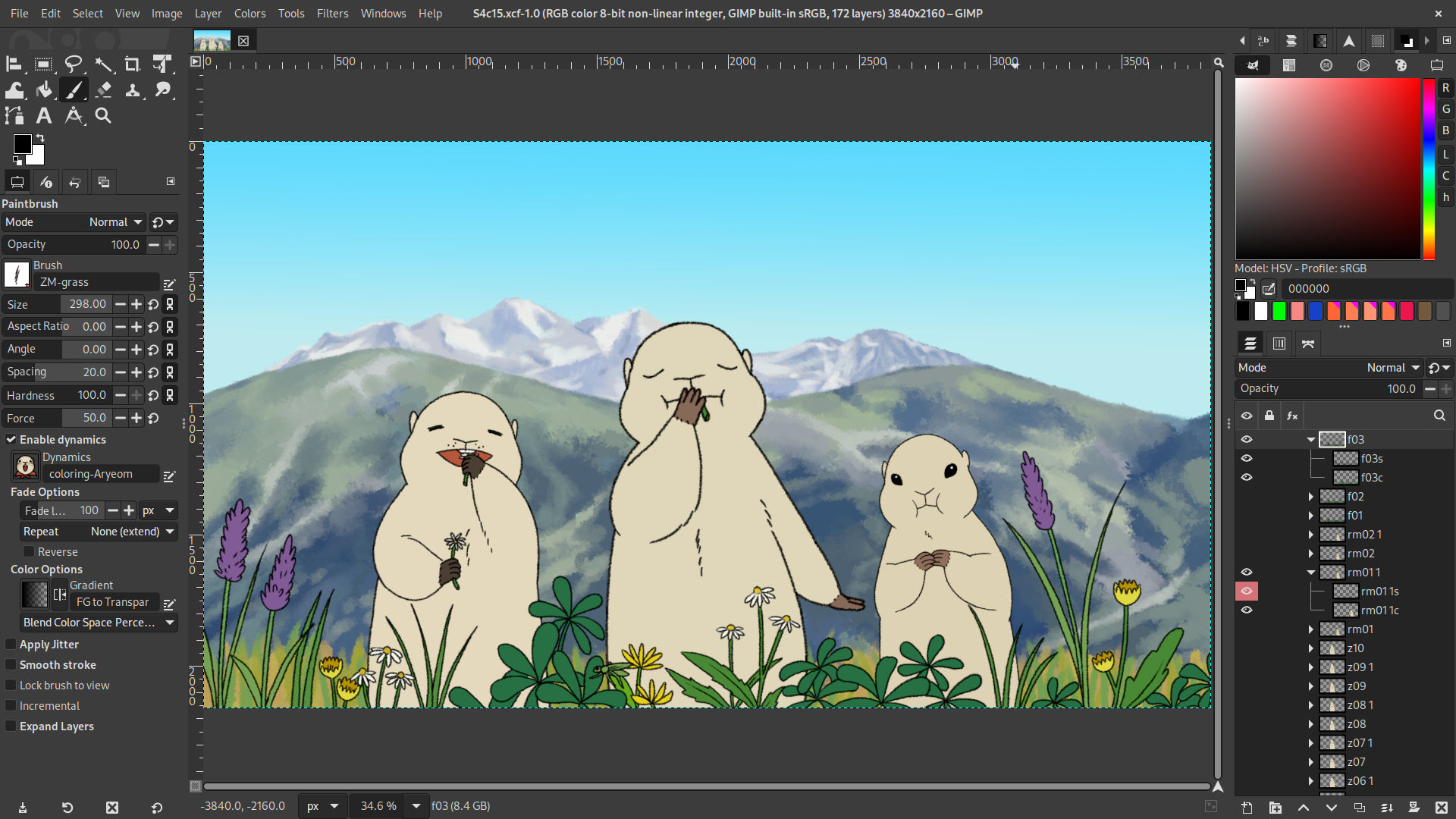
Scene 4 cut 15 of "ZeMarmot" being edited in GIMP. Illustration by Aryeom (CC by-sa 4.0 International) |
Scene 4 cut 15 of "ZeMarmot" being edited in GIMP. Illustration by Aryeom (CC by-sa 4.0 International) |
Сцена 4, шматок 15 з «ZeMarmot» під час редагування у GIMP. Ілюстрація від Aryeom (CC by-sa 4.0 International) |
"ZeMarmot"-ის მეოთხე სცენის მე-15-ე ამოჭრა GIMP-ში ჩაასწორეს. ილუსტრაცია Aryeom-სგან (CC by-sa 4.0 International) |
GIMP 中正在编辑的“ZeMarmot”场景 4 剪辑 15。创作者 Aryeom(CC by-sa 4.0 International) |
"ZeMarmot"un 4. sahnesinin 15. kesiti GIMP’te düzenleniyor. Çizer: Aryeom (CC by-sa 4.0 International) |
Scen 4 bild 15 av ”ZeMarmot” som redigeras i GIMP. Illustration av Aryeom (CC by-sa 4.0 Internationell) |
Escena 4, corte 15 de «ZeMarmot» editado en GIMP. Ilustración de Aryeom (CC BY-SA 4.0 International) |
"ZeMarmot" filmaren 4. eszenaren 15. ebaketa, GIMP aplikazioan editatua. Ilustrazioa: Aryeom (CC by-sa 4.0 International) |
Scena 4, taglio 15 di "ZeMarmot" in fase di editing con GIMP. Illustrazione di Aryeom (CC by-sa 4.0 International) |
Escena 4, tall 15 de «ZeMarmot» que s'està editant en el GIMP. Il·lustració d'Aryeom (CC by-sa 4.0 International) |
Scene 4 geknipt uit 15 van "ZeMarmot" in bewerking in GIMP. Illustratie door Aryeom (CC by-sa 4.0 International) |
Scene 4, klip 15 af “ZeMarmot” redigeret i GIMP. Illustration af Aryeom (CC by-sa 4.0 International) |
Scene 4 utsnitt 15 av «ZeMarmot» redigert i GIMP. Illustrasjon av Aryeom (CC by-sa 4.0 International) |
Сцена 4, ролка 15 от „Мармота“ (ZeMarmot), редактирана в GIMP. Илюстрация от Aryeom (CC by-sa 4.0 International) |
|
|
|
|
| default |
caption |
thumbnails |
source-image |
| true |
| de |
sl |
en-GB |
C |
uk |
ka |
zh-Hans-CN |
tr |
sv |
es |
eu |
it |
ca |
nl |
da |
nn |
bg |
| Foto einer Möwe am Strand wird in GIMP bearbeitet. Foto von Iana (CC by-sa 4.0 International) |
Fotografija galeba na plaži, urejeno v GIMP-u. Fotografija Iana (CC by-sa 4.0 International) |
Gull on beach photograph being edited in GIMP. Photo by Iana (CC by-sa 4.0 International) |
Gull on beach photograph being edited in GIMP. Photo by Iana (CC by-sa 4.0 International) |
Фотографія чайки на пляжі під час редагування у GIMP. Фото Iana (CC by-sa 4.0 International) |
სურათი თოლია პლაჟზე ჩაასწორეს GIMP-ში. ფოტოს ავტორია Iana (CC by-sa 4.0 International) |
GIMP 中正在编辑的海滩上的海鸥。拍摄者 Iana(CC by-sa 4.0 International) |
Kumsaldaki martı fotoğrafı GIMP’te düzenleniyor. Fotoğrafçı: Iana (CC by-sa 4.0 International) |
Fotografi av mås på strand som redigeras i GIMP. Foto av Iana (CC by-sa 4.0 Internationell) |
Fotografía de una gaviota en la playa editada en GIMP. Foto de Iana (CC BY-SA 4.0 International) |
Kaioa hondartzan, GIMP aplikazioan editatua. Argazkia: lana (CC by-sa 4.0 International) |
Fotografia di un gabbiano sulla spiaggia in fase di modifica con GIMP. Foto di Iana (CC by-sa 4.0 International) |
Fotografia d'una gavina a la platja que s'està editant en el GIMP. Foto d'Iana (CC by-sa 4.0 International) |
Foto Zeemeeuw op strand, in bewerking in GIMP. Foto van Iana (CC by-sa 4.0 International) |
Foto af måge på stranden redigeret i GIMP. Foto af Iana (CC by-sa 4.0 International) |
Måke på strand er redigert i GIMP. Foto v Iana (CC by-sa 4.0 International) |
Снимка на чайка на плажа, редактирана в GIMP. Фотография от Iana (CC by-sa 4.0 International) |
|
|
|
|
| default |
caption |
thumbnails |
source-image |
| true |
| de |
sl |
en-GB |
C |
uk |
ka |
zh-Hans-CN |
tr |
sv |
es |
eu |
it |
ca |
nl |
da |
nn |
bg |
| Porträt von Sofiia wird in GIMP bearbeitet. Foto von Sofia (CC by-sa 4.0 International) |
Portret Sofiie, urejen v GIMP-u. Foto: Sofia (CC by-sa 4.0 International) |
Portrait of Sofiia being edited in GIMP. Photo by Sofia (CC by-sa 4.0 International) |
Portrait of Sofiia being edited in GIMP. Photo by Sofia (CC by-sa 4.0 International) |
Портрет Софії під час редагування у GIMP. Фотографія Sofia (CC by-sa 4.0 International) |
Sofia-ის პორტრეტი ჩაასწორეს GIMP-ში. ფოტოს ავტორია Iana (CC by-sa 4.0 International) |
GIMP 中正在编辑的索菲亚的人像。拍摄者索菲亚(CC by-sa 4.0 International) |
Sofiia’nın portresi GIMP’te düzenleniyor. Fotoğrafçı: Sofia (CC by-sa 4.0 International) |
Porträtt av Sofiia som redigeras i GIMP. Foto av Sofia (CC by-sa 4.0 Internationell) |
Retrato de Sofía editado en GIMP. Foto de Sofía (CC BY-SA 4.0 International) |
Sofiaren erretratua, GIMP aplikazioan editatua. Argazkia: Sofia (CC by-sa 4.0 International) |
Ritratto di Sofia in fase di modifica con GIMP. Foto di Sofia (CC by-sa 4.0 International) |
Retrat de la Sofiia que s'està editant en el GIMP. Foto de Sofia (CC by-sa 4.0 International) |
Portret van Sofia, in bewerking in GIMP. Foto van Sofia (CC by-sa 4.0 International) |
Portræt af Sofiia redigeret i GIMP. Foto af Sofia (CC by-sa 4.0 International) |
Portrett av Sofiia redigert i GIMP. Foto av Sofia (CC by-sa 4.0 International) |
Портрет на София, редактиран в GIMP. Фотография от Sofia (CC by-sa 4.0 International) |
|
|
|
|
| default |
caption |
thumbnails |
source-image |
| true |
| de |
sl |
en-GB |
C |
uk |
ka |
zh-Hans-CN |
tr |
sv |
es |
eu |
it |
ca |
nl |
da |
nn |
bg |
| Gescannte Gravur wird in GIMP bearbeitet. Kunstwerk von Liam (CC0) |
Skenirana gravura, urejena v GIMP-u. Umetniško delo Liama (CC0) |
Scanned engraving being edited in GIMP. Artwork by Liam (CC0) |
Scanned engraving being edited in GIMP. Artwork by Liam (CC0) |
Редагування сканованого гравірування у GIMP. Художня робота Liam (CC0) |
დასკანერებულია გრავიურის ჩასწორება ხდება GIMP-ში. Liam-ის (CC0) ნამუშევარი |
GIMP 中正在编辑的扫描版画。创作者 Liam(CC0) |
Taranmış oyma GIMP’te düzenleniyor. Sanatçı: Liam (CC0) |
Inläst gravyr som redigeras i GIMP. Illustration av Liam (CC0) |
Grabado escaneado editado en GIMP. Ilustración de Liam (CC0) |
Eskaneatutako bozeltzea, GIMP aplikazioan editatua. Argazkia: Liam (CC by-sa 4.0 International) |
Incisione digitalizzata in fase di modifica con GIMP. Opera di Liam (CC0) |
Gravat escanejat que s'està editant en el GIMP. Obra de Liam (CC0) |
Gescande gravering, in bewerking in GIMP. Kunstwerk van Liam (CC0) |
Skannet gravering der redigeres i GIMP. Kunstværk af Liam (CC0) |
Scanna gravering redigert i GIMP. Kunstverk av Liam (CC0)k |
Сканирана гравюра, редактирана в GIMP. Картина от Liam (CC0) |
|
|
|
|
|
| version |
unix-timestamp |
description |
| 3.0.6 |
1759536000 |
| C |
| <p>This micro release in the 3.0 series fixes some major bugs, assorted with various usability improvements.</p>
<ul>
<li>New toggle in Brushes and Fonts dialogs to render their previews using theme colors</li>
<li>The Print plug-in now pops a second dialog for fine-tuning prints in sandboxed environments (e.g. Flatpak or Snap)</li>
<li>A bug in Windows prevented GIMP to work when the system was set to specific locales</li>
<li>Various usability issues have been handled</li>
<li>Reported instabilities and vulnerabilities were fixed</li>
</ul> |
|
|
| version |
unix-timestamp |
description |
| 3.0.4 |
1747440000 |
| C |
| <p>This second micro release in the 3.0 series fixes various bugs and improves usability in several parts of the interface:</p>
<ul>
<li>MyPaint Brush: tool options layout made more consistent with other paint tools</li>
<li>Paths: clicking on the starting point in design mode closes the path</li>
<li>Scissors Select: pressing Enter connects the start and end points</li>
<li>Pencil: "Force" slider is now hidden in the tool options</li>
<li>Dockable dialogs in Windows have titlebars matching the theme's dark mode setting</li>
<li>Editing non-destructive filters now creates undo steps</li>
<li>Optimized font loading for faster startup</li>
<li>Improvements in various file format supports</li>
<li>And more bug fixes and usability improvements…</li>
</ul> |
|
|
| version |
unix-timestamp |
description |
| 3.0.2 |
1742688000 |
| C |
| <p>As could be expected from a major release, a few critical bugs slipped through our testing!
This first micro-point release fix such bugs.</p> |
|
|
| version |
unix-timestamp |
description |
| 3.0.0 |
1742083200 |
| fr |
C |
ja |
| <ul>
<li>Sélection multiple de calques dans le groupe de calques</li>
</ul> |
<p>Our initial release for the next generation in image manipulation!
While GIMP 3.0 has too many improvements to make an exhaustive list, here are
some of the highlights:</p>
<ul>
<li>Multi-selection of layers in the Layers dockable</li>
<li>Proper high pixel density display support</li>
<li>Improved graphics tablets support</li>
<li>Wayland support</li>
<li>New soft-proofing toggle in the status bar, with pop-over settings on right click</li>
<li>Initial UI for non-destructive layer effects</li>
<li>Paint tools now have an "Expand Layers" option and sub-options to auto-expand layers when painting over
their boundaries</li>
<li>Align and Distribute tool: completely reworked usage</li>
<li>Text tool: new "Outlined" and "Outlined and filled" options</li>
<li>New "Stroke borders" option in Bucket Fill tool's "Fill by line art detection"</li>
<li>Redesigned and reorganized "Fill by line art detection" settings</li>
<li>Deeply reworked API for plug-in developers</li>
<li>Plug-in API now available in C/C++, Python 3, Javascript, Lua, Vala and more</li>
<li>Improved support of many image formats</li>
</ul> |
<ul>
<li>Wayland のサポート</li>
</ul> |
|
|
| version |
unix-timestamp |
description |
| 3.0.0~rc3 |
1739059200 |
| C |
| <p>While GIMP 3.0 is getting more and more robust with this
third release candidate, some core changes require more testing.
Some of the highlights of this version are:</p>
<ul>
<li>Reworked image graph for even less destructive filters</li>
<li>BC7 compression support for DDS file import</li>
<li>Improved PSD support (16-bit per channel LAB import, metadata, etc.)</li>
<li>Various API improvements for plug-in developers</li>
<li>Script-Fu: new named-argument syntax for functions generated from PDB procedures</li>
<li>Many bug fixes and a much more robust base overall</li>
</ul> |
|
|
| version |
unix-timestamp |
description |
| 3.0.0~rc2 |
1735257600 |
| C |
| <p>The second release candidate for the upcoming GIMP 3.0.0 features a lot of bug fixes, as well as a few
necessary core or plug-in changes:</p>
<ul>
<li>New API functions for handling layer effects from plug-ins</li>
<li>More compat PDB procedures removed in favor of new API</li>
<li>Perceptual space for layer mode renamed non-linear and real perceptual space added</li>
<li>Major BMP support improvement</li>
<li>Many bug fixes</li>
</ul> |
|
|
| version |
unix-timestamp |
description |
| 3.0.0~rc1 |
1730678400 |
| C |
| <p>GIMP 3.0.0-RC1 is the first release candidate of the GIMP 3 stable branch.
Most work has happened under the hood on bug fixes, API changes,
plug-ins ported to new API and stability in general.
Some more visible changes include:</p>
<ul>
<li>Logo updated</li>
<li>The dialog for layer effects now proposes a "Merge filter" checkbox</li>
<li>Arrow key navigation in item dockables is now multi-layer aware</li>
<li>Dockable tab navigation with scroll input was reimplemented (feature removed from GTK)</li>
<li>New support for Sketchbook TIFF layers</li>
<li>Public libgimp API v3 now stable</li>
</ul> |
|
|
| version |
unix-timestamp |
description |
| 2.99.18 |
1708128000 |
| C |
| <p>GIMP 2.99.18 may be the last development version before release candidates, since we entered
GUI feature freeze.
This release contains huge core logic updates on several areas so we are really welcoming
feedbacks and reports to reach stability state sooner.
Here are some of the more visible improvements:</p>
<ul>
<li>Initial UI for non-destructive layer effects</li>
<li>Pervasize update on color correctness</li>
<li>Paint tools now have an "Expand Layers" option and sub-options to auto-expand layers when painting over
their boundaries</li>
<li>Better font handling</li>
<li>New snapping options</li>
<li>New image format supports: Farbfeld (import and export), Esm Software PIX (import only), HEJ2 (import only)</li>
<li>Improved image format supports: DDS, GIF, HEIF, JPEG-XL, OpenEXR, PDF, PNG, PSD, PSP.</li>
<li>New palette format support: Swatchbooker</li>
<li>On Windows, the title bar will use light or dark mode depending on the current theme</li>
<li>On Wayland, pad buttons can be mapped to actions</li>
<li>Major API updates</li>
</ul> |
|
|
| version |
unix-timestamp |
description |
| 2.99.16 |
1688515200 |
| C |
| <p>GIMP 2.99.16 marks the end of the GTK+3 port as there is no massive usage of deprecated GTK API anymore.
We are therefore getting extremely close to release candidates!
Apart from internal work on the codebase, here are some of the more visible improvements:</p>
<ul>
<li>Action search now displays the menu path for actions and a help icon</li>
<li>An action is generated for every third-party GEGL operation</li>
<li>GEGL operations can register a menu item through the "gimp:menu-path" key</li>
<li>Log-off and shutdown can be inhibited when images are not saved</li>
<li>New option "Merge menu and title bar" for client-side decorations on image windows</li>
<li>New "Middle Gray (CIELAB)" fill option (new image or new layer)</li>
<li>The Stroke Selection dialog has been reorganized</li>
<li>New "Grayscale (%)" view in Color Picker tool's info window and sample points</li>
<li>Better ACO color palettes support, ported to babl, including CIELAB palettes</li>
<li>Themes are still being worked on</li>
<li>JPEG-XL: initial support for CMYK/A export</li>
<li>PSD: support of clipping path import and export</li>
<li>PSD: compatibility warning dialogs raised on import and export, when relevant</li>
<li>TIFF: PSD metadata and IBM PC layers now supported on import</li>
<li>JPEG: PSD metadata and clipping paths now supported on import</li>
<li>DDS: OpenMP support enabled when available</li>
<li>FITS: import and export code ported to cfitsio, resulting in much better coverage</li>
<li>Newly added support for import and export: PAM and QOI</li>
<li>Newly added import-only support: Amiga IFF/ILBM and DCX</li>
<li>Script-Fu: new type 'byte' to handle binary data</li>
</ul> |
|
|
| version |
unix-timestamp |
description |
| 2.99.14 |
1668297600 |
| C |
| <p>GIMP 2.99.14 was released with the following noteworthy improvements:</p>
<ul>
<li>Align and Distribute tool: completely reworked usage</li>
<li>Text tool: new "Outlined" and "Outlined and filled" options</li>
<li>Floating selections not created anymore when pasting new layers</li>
<li>New "Gray" theme based on a 18.42% luminance middle-gray background</li>
<li>Icon sizes can be overridden in Preferences > Themes</li>
<li>Faster save of XCF files</li>
<li>XCF file format improved with a proper structure for path items</li>
<li>PDF export: new "Root layers only" sub-option for "Layers as pages"</li>
<li>AVIF export: improved compatibility with various browsers' implementations</li>
<li>PSD export: CMYK support added</li>
<li>JPEG-XL: metadata are now imported and exported</li>
<li>ICNS: initial import/export support</li>
<li>TIFF import: new option "Show reduced images"</li>
<li>More progression for the GTK+3 port</li>
<li>New and modified functions or classes for the upcoming 3.0 API</li>
</ul> |
|
|
| version |
unix-timestamp |
description |
| 2.99.12 |
1661040000 |
| C |
| <p>One step further towards GIMP 3.0, GIMP 2.99.12 comes along with the following noteworthy improvements:</p>
<ul>
<li>New "Stroke borders" option in Bucket Fill tool's "Fill by line art detection"</li>
<li>Redesigned and reorganized "Fill by line art detection" settings</li>
<li>New "Default" and "Compact" themes with dark and light variants</li>
<li>New "Drag-to-zoom" behavior and speed settings in Preferences</li>
<li>On-canvas modifiers are now customizable</li>
<li>Tool pointer settings reorganized and moved from "Image Windows" to "Input Devices" tabs in
Preferences</li>
<li>Improved handling of unchecked "Show pointer for paint tools" option</li>
<li>Touchpad gesture rotation (2-finger pinch) on canvas</li>
<li>Preview size in item dockables now settable with Ctrl+wheel and pinch gesture</li>
<li>Gradient editor can be zoomed with pinch gesture</li>
<li>New soft-proofing toggle in the status bar, with pop-over settings on right click</li>
<li>CMYK export implemented and import improved for JPEG, using the soft-proofing profile</li>
<li>CMYK(A) import and export support for 8 and 16-bit TIFF files, using the soft-proofing profile</li>
<li>Improved CMYK import support for PSD files, using the soft-proofing profile</li>
<li>The CMYK color selector is now simulation-space (soft-proofing) aware</li>
<li>Added support for the BigTIFF file format</li>
<li>Minimal support of Duotone PSD files</li>
<li>SVG import can now disable size parsing (with security implications)</li>
<li>New option "Number of repeats" in GIF export</li>
<li>PNG export has a new settings to optimize the palette size of indexed images</li>
<li>New "Flip image" option in DDS export, as needed by some game engines</li>
<li>Various improvements to DDS support, in particular for 16-bit channels</li>
<li>Various improvements to FLI support</li>
<li>Various improvements to RAW data support</li>
<li>New WBMP format initial support</li>
<li>New ANI format initial support</li>
<li>Huge internal work on script-fu</li>
<li>New command line option --quit to quit GIMP immediately after running batch commands, propagating script failure
in exit code</li>
<li>The command line option --batch-interpreter is now mandatory for --batch as there is no default interpreter anymore</li>
<li>Many plug-in API improvements</li>
</ul> |
|
|
| version |
unix-timestamp |
description |
| 2.99.10 |
1645488000 |
| C |
| <p>GIMP 2.99.10 is a notable development release in the 2.99 series, featuring many changes.
Let's mention in particular:</p>
<ul>
<li>"Linked layers" concept superseded by new "Layer set" concept</li>
<li>Lock icons in item dockables (Layers, Channels, Paths) moved next to the visibility (eye) icon</li>
<li>Alt-click on visibility and lock icons in item dockables massively toggles visibility and locks among selected
items</li>
<li>Item dockables now display icon headers for visibility and locks column</li>
<li>Our System theme shows visible hints around unset visibility and locks icons when hovering them in item dockables</li>
<li>New checkbox to enable or disable dynamics in paint tools' options (replacing "Dynamics Off" dynamics)</li>
<li>Improved support for Wayland and macOS Big Sur (and newer)</li>
<li>"Fill by line art detection" in Bucket Fill tool has a new option</li>
<li>Channels and paths multi-selectable with part of relevant actions working</li>
<li>Various file format support improvements, in particular to PSD, JPEG-XL and HEIF</li>
<li>New support of Microsoft Windows Cursor file format (.cur files)</li>
<li>Removed KDE and GNOME screenshot portals in favor of Freedesktop one</li>
<li>Windows screenshot implementation now has an "Include mouse pointer" option</li>
<li>New and modified libgimp API for plug-in developers</li>
</ul> |
|
|
| version |
unix-timestamp |
description |
| 2.99.8 |
1634428800 |
| C |
| <p>While during this fourth cycle of development, many efforts were devoted to
infrastructure, GIMP 2.99.8 still received many welcome improvements, notably:</p>
<ul>
<li>New modes in Clone, Heal and Perspective Clone tools when multiple layers are selected</li>
<li>Windows Ink support for input devices on Windows</li>
<li>Clicking on toolbox or Wilber's drop area actively focuses the canvas</li>
<li>Marching ants display ported to Wayland and macOS Big Sur logics</li>
<li>Initial implementation of config folder migration for GIMP 3</li>
<li>Action "view-rotate-reset" renamed to "view-reset" and new "view-rotate-reset" and
"view-flip-rotate" actions</li>
<li>PSD: bigger-than-4GiB file support and up to 99 channels</li>
<li>PSB: new support (loading only)</li>
<li>SGI: 16-bit images support</li>
<li>JPEG XL: new support (loading and exporting)</li>
<li>New API functions gimp_display_present() and gimp_procedure_dialog_fill_expander()</li>
<li>Much porting to newer API, code cleanup and bug fixing done</li>
</ul> |
|
|
| version |
unix-timestamp |
description |
| 2.99.6 |
1619395200 |
| C |
kab |
| <p>For this third development release, more development effort has been shifted towards the API.
Many functions were renamed for consistent naming scheme, some
new functions appeared, some had signature changes, fixes were
made to improve introspection binding of others, and so on.
More API updates are to be expected on further development releases where stability is not guaranteed.</p>
<p>Regarding end-creator changes, some notable improvements are:</p>
<ul>
<li>Canvas Size dialog now displays a template selector</li>
<li>Off-canvas guides are now allowed</li>
<li>The experimental Paint Select tool got various improvements</li>
<li>More fixes for Wayland support</li>
<li>Dialog dropped for the Freedesktop portal implementation of the screenshot plug-in</li>
<li>PNG import creates an ICC profile out of the gAMA and/or cHRM chunks</li>
<li>TIFF export stores the ICC profile and comment on each layer to prevent ambiguous files</li>
</ul> |
<ul>
<li>Adiwenni n n tiddi n teɣzut n usuneɣ ad ibeqqeḍ tura amafran n teɣruft</li>
</ul> |
|
|
| version |
unix-timestamp |
description |
| 2.99.4 |
1608595200 |
| fr |
C |
ja |
| <ul>
<li>Nombreuses améliorations d’usage du composant curseur</li>
<li>Nettoyages concernant la convivialité du groupe de calques</li>
</ul> |
<p>This second development release contains various usability and API updates.
A new experimental tool makes an entrance in the playground.</p>
<ul>
<li>Many usability improvements on the slider widget</li>
<li>Usability cleaning in the Layers dockable</li>
<li>The action search now shows all actions even inactive ones (yet pushed below)</li>
<li>Fonts targeted for Korean and Japanese language show appropriate characters</li>
<li>Different default tools depending on pointer device type</li>
<li>Default dynamics is now "Pressure Size"</li>
<li>Various usability improvements in the Input Device editor</li>
<li>New "Paint Select" experimental tool in the playground</li>
<li>Plug-in API now provides many dialog generation utilities</li>
</ul> |
<ul>
<li>スライダーウィジェットのユーザビリティの改善</li>
</ul> |
|
|
| version |
unix-timestamp |
description |
| 2.99.2 |
1603584000 |
| fr |
C |
ja |
kab |
| <ul>
<li>Sélection multiple de calques dans le groupe de calques</li>
<li>Amélioration de la prise en charge des périphériques d’entrée</li>
</ul> |
<p>This is the first development release for GIMP 3.0, whose focus
was the port to the GTK+3 toolkit. Noteworthy improvements
(though some are still work-in-progress) include:</p>
<ul>
<li>Multi-selection of layers in the Layers dockable</li>
<li>Proper high pixel density display support</li>
<li>Improved input device support</li>
<li>Major plug-in API rewrite</li>
<li>Plug-in API now available in C/C++, Python 3, Javascript, Lua and Vala</li>
<li>New manageable extension format</li>
<li>CSS-based themes and actual symbolic icon theme support</li>
<li>Wayland support</li>
</ul> |
<ul>
<li>入力デバイスのサポートの改善</li>
<li>主要なプラグイン API の書き直し</li>
<li>プラグイン API は現在 C/C++、Python 3、Javascript、Lua、Vala で利用可能です</li>
<li>Wayland のサポート</li>
</ul> |
<ul>
<li>Amasal amaynut n usiɣzef yettwasefraken</li>
</ul> |
|
|
| version |
unix-timestamp |
description |
| 2.10.38 |
1714608000 |
| C |
pl |
| <p>GIMP 2.10.38 has been the first bug-fix only release for a long
time, correcting various bugs, some more annoying than others.</p>
<p>On Windows, the Windows Ink API support has been backported.</p> |
<p>GIMP 2.10.38 to pierwsze wydanie wyłącznie naprawiające błędy od długiego czasu, poprawiające różne błędy, niektóre bardziej irytujące od innych.</p>
<p>W systemie Windows dodano obsługę API Windows Ink z nowszych wersji.</p> |
|
|
| version |
unix-timestamp |
description |
| 2.10.36 |
1699142400 |
| C |
pl |
| <p>This new version of GIMP comes with many fixes, including
vulnerability corrections. It is highly recommended to update. It
also provides a few interesting changes, such as:</p>
<ul>
<li>Adobe ACB and ASE palette support</li>
<li>New gradient: FG to Transparent (Hardedge)</li>
<li>Some text tool algorithm enhancement when replacing formatted text</li>
<li>Better theming of item locks (when hovering them or setting them active)</li>
<li>Improvements in handling a few specific metadata</li>
</ul> |
<p>Ta nowa wersja programu GIMP zawiera wiele poprawek, w tym korekty zabezpieczeń. Aktualizacja jest wysoce zalecana. Zawiera także kilka interesujących zmian, takich jak:</p>
<ul>
<li>Obsługa palet ACB i ASE firmy Adobe</li>
<li>Nowy gradient: kolor pierwszoplanowy na przezroczystość (twarda krawędź)</li>
<li>Pewne ulepszenia algorytmu narzędzia tekstowego podczas zastępowania sformatowanego tekstu</li>
<li>Lepszy motyw blokad elementów (po najechaniu na nie kursorem i ich włączaniu)</li>
<li>Ulepszenia w obsłudze pewnych konkretnych metadanych</li>
</ul> |
|
|
| version |
unix-timestamp |
description |
| 2.10.34 |
1676937600 |
| C |
pl |
| <p>A new stable releases with a lot of bug fixes and a few enhancements:</p>
<ul>
<li>New template selector in "Canvas Size" dialog</li>
<li>"Change Color" dialogs: color scale (0..255/0..100) and models (LCh/HSV) settings remembered across
sessions</li>
<li>New header with "visible" and "link" icons in item dockables</li>
<li>Clipping layers better supported when importing PSD files</li>
<li>Paths are now exported to PSD</li>
<li>JPEG XL export added</li>
<li>Metadata in JPEG XL import</li>
<li>New option "Show reduced images" when loading TIFF images</li>
<li>16-bit per channel export for raw image data</li>
<li>More plug-ins got bug-fixes: DDS, WebP, Flame, Animation Playback, HEIF, Dicom and Help</li>
<li>Color picking on X11 will ignore the Wayland portal; new implementation for color picking on Windows</li>
<li>Check for updates fixed on macOS</li>
</ul> |
<p>Nowe stabilne wydanie z wieloma poprawkami błędów i kilkoma ulepszeniami:</p>
<ul>
<li>Nowa opcja wyboru szablonu w oknie „Wymiary płótna”</li>
<li>Okna „Zmień kolor”: ustawienia skali kolorów (0…255/0…100) i modeli (LCh/HSV) są zapamiętywane między sesjami</li>
<li>Nowy nagłówek z ikonami „widoczne” i „dowiązanie” w panelach elementów</li>
<li>Przycinanie warstw jest lepiej obsługiwane podczas importowania plików PSD</li>
<li>Ścieżki są teraz eksportowane do plików PSD</li>
<li>Dodano obsługę eksportu do JPEG XL</li>
<li>Obsługa metadanych w imporcie JPEG XL</li>
<li>Nowa opcja „Wyświetlanie zmniejszonych obrazów” podczas wczytywania obrazów TIFF</li>
<li>Eksport 16 bitów na kanał w danych obrazów Raw</li>
<li>Więcej wtyczek otrzymało poprawki błędów: DDS, WebP, Płomień, Odtwarzanie animacji, HEIF, Dicom i Pomoc</li>
<li>Wybór koloru na X11 będzie ignorował portal Wayland, nowa implementacja wyboru koloru w systemie Windows</li>
<li>Naprawiono wyszukiwanie aktualizacji w systemie macOS</li>
</ul> |
|
|
| version |
unix-timestamp |
description |
| 2.10.32 |
1654992000 |
| C |
pl |
| <p>GIMP continues strengthening its bases with this new version 2.10.32 fixing many bugs and improving format support.
Notable changes:</p>
<ul>
<li>8 and 16-bit CMYK(A) TIFF files import is now supported</li>
<li>BIGTIFF import and export are now supported</li>
<li>JPEG XL files import is now supported</li>
<li>DDS export has new "Flip" (useful for some game engine) and "Visible layers" options</li>
<li>Other improved format supports: BMP, DICOM, EPS, RAW, TGA, WebP</li>
<li>The screenshot plug-in on Windows has now an option to capture the cursor</li>
<li>Several usability improvements in official themes and icons</li>
<li>New support for localized glyphs ('locl') in Text tool
depending on the value of the "Language" tool option</li>
<li>More robust XCF import</li>
<li>Several metadata handling improvements</li>
</ul> |
<p>GIMP kontynuuje wzmacnianie swoich podstaw w nowej wersji 2.10.32, która naprawia błędy i ulepsza obsługę różnych formatów:</p>
<ul>
<li>Obsługiwany jest teraz import 8- i 16-bitowych plików TIFF w CMYK(A)</li>
<li>Obsługiwany jest teraz import i eksport plików BIGTIFF</li>
<li>Obsługiwany jest teraz import plików JPEG XL</li>
<li>Eksport plików DDS ma teraz opcje odbicia (przydatne przy niektórych silnikach gier) i widocznych warstw</li>
<li>Ulepszona obsługa innych formatów: BMP, DICOM, EPS, RAW, TGA i WebP</li>
<li>Wtyczka wykonywania zrzutów ekranu w systemie Windows ma teraz opcję zachowania kursora na zrzucie</li>
<li>Kilka ulepszeń użyteczności w oficjalnych motywach i ikonach</li>
<li>Nowa obsługa lokalizowanych glifów („locl”) w narzędziu tekstowym w zależności od wartości opcji „Język” narzędzia</li>
<li>Solidniejszy import plików XCF</li>
<li>Kilka ulepszeń obsługi metadanych</li>
</ul> |
|
|
| version |
unix-timestamp |
description |
| 2.10.30 |
1639872000 |
| C |
pl |
| <p>GIMP 2.10.30 fixes many bugs, updates backend implementations
to follow OS evolutions, improves metadata support as well as
support of several formats, such as PSD and AVIF.</p> |
<p>GIMP 2.10.30 naprawia wiele błędów, aktualizuje implementacje mechanizmów zgodnie ze zmianami w systemach operacyjnych, ulepsza obsługę metadanych oraz kilku formatów, takich jak PSD i AVIF.</p> |
|
|
| version |
unix-timestamp |
description |
| 2.10.28 |
1631577600 |
| C |
pl |
| <p>GIMP 2.10.28 fixes a build issue of GIMP 2.10.26, where some
theme data was not properly installed.</p> |
<p>GIMP 2.10.28 naprawia problem podczas budowania wydania 2.10.26, przez który część danych motywu nie była właściwie instalowana.</p> |
|
|
| version |
unix-timestamp |
description |
| 2.10.26 |
1630800000 |
| C |
pl |
| <p>GIMP 2.10.26 is a bug fix release, containing dozens of
fixes, both in core, scripts and plug-in code.</p> |
<p>GIMP 2.10.26 zawiera dziesiątki poprawek błędów, zarówno w głównym programie, jak i skryptach oraz wtyczkach.</p> |
|
|
| version |
unix-timestamp |
description |
| 2.10.24 |
1616889600 |
| fr |
C |
pl |
kab |
| <p>GIMP 2.10.24 est encore une publication essentiellement de correction de bogues et d’optimisation. Elle contient en particulier :</p>
<ul>
<li>Nouvelle traduction en kabyle</li>
</ul> |
<p>GIMP 2.10.24 is again mostly a bug fix release. Notable changes:</p>
<ul>
<li>GeoTIFF metadata support added</li>
<li>PDF import now proposes an option to load layers in reverse
orders and allows fractional pixel density</li>
<li>Raw image import updated to handle API changes in darktable 3.6 and over</li>
<li>File format improved support: HEIF, PSP, TIFF, JPEG, PNG, PDF, DDS, BMP, PSD</li>
<li>Many fixes and improvements to the metadata viewer and editor</li>
<li>New Kabyle translation</li>
<li>Off-canvas point snapping (to grid, guides, paths) made possible</li>
</ul> |
<p>GIMP 2.10.24 ponownie zawiera głównie poprawki błędów:</p>
<ul>
<li>Dodano obsługę metadanych GeoTIFF</li>
<li>Import plików PDF oferuje teraz opcję wczytania warstw w odwróconej kolejności i umożliwia korzystanie z ułamkowej
gęstości pikseli</li>
<li>Zaktualizowano import obrazów Raw do obsługi zmian API w darktable 3.6 i nowszych</li>
<li>Ulepszono obsługę formatów plików HEIF, PSP, TIFF, JPEG, PNG, PDF, DDS, BMP i PSD</li>
<li>Wiele poprawek i ulepszeń w przeglądarce i edytorze metadanych</li>
<li>Nowe tłumaczenie na język kabylski</li>
<li>Przyciąganie do punktów (siatki, prowadnic, ścieżek) poza obszarem rysowania jest teraz możliwe</li>
</ul> |
<p>GIMP 2.10.24 daɣen d aseɣti n ibugen. Ibeddilen yettbanen:</p>
<ul>
</ul> |
|
|
| version |
unix-timestamp |
description |
| 2.10.22 |
1601769600 |
| fr |
C |
pl |
ja |
kab |
| <p>GIMP 2.10.22 est principalement une version de corrections de bogues. Les changements notables :</p>
<ul>
<li>Améliorations de prise en charge du format HEIF : exportation facultative avec grande profondeur de bits, importation
et exportation AVIF</li>
<li>Améliorations multiples dans la prise en charge de Corel PaintShop Pro</li>
<li>L’option activant la prise en charge OpenCL a été déplacée dans l’onglet « Aire de jeu » des préférences</li>
<li>L’extraction Levin est dorénavant le moteur par défaut de l’outil de sélection de premier plan car il est bien
plus efficace</li>
<li>Diverses résolutions de bogues</li>
</ul> |
<p>GIMP 2.10.22 is mainly a bug fix release. Notable changes:</p>
<ul>
<li>HEIF support improvements: optional exporting with high bit depth,
AVIF importing and exporting</li>
<li>Multiple improvements in Corel PaintShop Pro support</li>
<li>"Sample merged" now available in GEGL operation tool options</li>
<li>"Sample merged" is now enabled by default for color picking</li>
<li>The option enabling OpenCL support has been moved to the
Playground tab in Preferences</li>
<li>Matting Levin is now the default engine of Foreground Select
tool as it performs a lot better</li>
<li>New progressive performance logs and dashboard updates</li>
<li>Verbose debug now shows Flatpak info when relevant</li>
<li>Various bug fixes</li>
</ul> |
<p>GIMP 2.10.22 zawiera głównie poprawki błędów:</p>
<ul>
<li>Ulepszenia obsługi formatu HEIF: opcjonalne eksportowanie z wysoką głębią, import i eksport AVIF</li>
<li>Wiele ulepszeń obsługi plików programu Corel PaintShop Pro</li>
<li>„Próbkowanie wszystkich warstw” jest teraz dostępne w opcjach narzędzi działań biblioteki GEGL</li>
<li>„Próbkowanie wszystkich warstw” jest teraz domyślnie włączone podczas wybierania koloru</li>
<li>Opcja włączenia obsługi OpenCL została przeniesiona do karty „Plac zabaw” w preferencjach</li>
<li>Mierzwienie Levina to teraz domyślny mechanizm zaznaczania pierwszego planu, jako że jest o wiele wydajniejszy</li>
<li>Nowe przyrostowe dzienniki wydajności i aktualizacje panelu wydajności</li>
<li>Zwiększone komunikaty debugowania wyświetlają teraz informacje pakietu Flatpak, kiedy jest używany</li>
<li>Różne poprawki błędów</li>
</ul> |
<p>GIMP 2.10.22 はバグ修正を主としたリリースです。主な変更点:</p>
<ul>
</ul> |
<p>GIMP 2.10.22 s umata d aseɣti n ibugen. Ibeddilen yettbanen:</p>
<ul>
<li>Aṭas n uwenneɛ di tedhelt n Corel PaintShop Pro</li>
<li>"Sample merged" yewjed tura di tnefrunin n ufecku n tmehlin</li>
<li>"Sample merged" tura yermed s lexṣas i welqaḍ n yiniten</li>
<li>Iɣewwaren n OpenCL muttin ɣer yiɣewwaren n Playground</li>
<li>Aɣmis amaynut n temellit s usfari akked yileqman n tfelwit n tedbelt</li>
<li>Aṭas n iseɣtiyen n ibugen</li>
</ul> |
|
|
| version |
unix-timestamp |
description |
| 2.10.20 |
1591488000 |
| fr |
C |
pl |
ast |
kab |
| <p>GIMP 2.10.20 apporte de nouvelles fonctions et un grand nombre de corrections de bogues. Les changements les plus notables sont :</p>
<ul>
<li>Les groupes d’outils se développent dorénavant par défaut au survol plutôt qu’au clic</li>
<li>Un rognage non destructif est disponible en rognant le canevas plutôt que les pixels eux-mêmes</li>
<li>Meilleure prise en compte du format PSD : l’exportation des fichiers 16 bits est maintenant disponible, avec lecture
ou écriture des canaux dans le bon ordre</li>
<li>Réglages sur canevas pour le filtre Vignette</li>
<li>Nouveaux filtres : Flou lumineux, Flou de mise au point, Flou de lentille, Flou variable</li>
<li>Plus de 30 résolutions de bogues</li>
</ul> |
<p>GIMP 2.10.20 comes with new features as well as important bugfixes.
Notable changes:</p>
<ul>
<li>Tool groups now expand on hover rather than click by default</li>
<li>Non-destructive cropping now available by cropping the canvas rather
than actual pixels</li>
<li>Better PSD support: exporting of 16-bit files now available,
reading/writing channels in the right order</li>
<li>On-canvas controls for the Vignette filter</li>
<li>New filters: Bloom, Focus Blur, Lens Blur, Variable Blur</li>
<li>Over 30 bugfixes</li>
</ul> |
<p>GIMP 2.10.20 zawiera nowe funkcje oraz ważne poprawki błędów:</p>
<ul>
<li>Grupy narzędzi są teraz domyślnie rozwijane po najechaniu zamiast kliknięciu</li>
<li>Niedestrukcyjne kadrowanie dzięki kadrowaniu obszaru rysowania zamiast pikseli</li>
<li>Lepsza obsługa plików PSD: eksport plików 16-bitowych, odczyt/zapis kanałów we właściwej kolejności</li>
<li>Sterowanie filtrem winiety na obszarze rysowania</li>
<li>Nowe filtry: poświata, rozmycie ostrości, rozmycie soczewki, zmienne rozmycie</li>
<li>Ponad 30 poprawek błędów</li>
</ul> |
<p>GIMP 2.10.20 vien con carauterístiques nueves, y con igües importantes de fallos. Cambeos bultables:</p>
<ul>
<li>Los grupos de ferramientes agora ábrense, de manera predeterminada, al pasar el mur, en vez de al calcar</li>
<li>Hai disponible un recorte non destructivu recortando'l llenzu en vez de píxeles reales</li>
<li>Meyor sofitu PSD: esportación de ficheros de 16 bits disponibles agora, llectura / escritura de canales nel orde
correchu</li>
<li>Controles en llenzu pa la peñera de viñeta</li>
<li>Peñeres nueves: Flor, difuminación de focu, difuminación de llente, difuminación variable</li>
<li>Más de 30 igües de fallos</li>
</ul> |
<p>GIMP 2.10.20 yusa-d s twuriwin timaynutin akked yiseɣtiyen imaqranen n ibugen. Ibeddilen yettbanen:</p>
<ul>
<li>Igrawen n yifecka fettin tura s usrifeg n tɣerdayt mačči s ussiti</li>
<li>Aɣẓaẓ ur netthuddu yara yewjed tura s uɣẓaẓ n teɣzut n usuneɣ deg umḍiq n yipikselen</li>
<li>Tadhelt n PSD tif tin n zik: asifeḍ n yifuyla n 16-ibiten yewjed tura, taɣuri/tira n yibuda deg umizzwer iwatan</li>
<li>Isenqaden n testayt n tebzimt ɣef teɣzut n usuneɣ</li>
<li>Tistayin timaynutin: tajeǧǧigt, aluɣu s uaḍes, aluɣu n tniltit, aluɣu ameskil</li>
<li>Ugar n 30 n iseɣtiyen n ibugen</li>
</ul> |
|
|
| version |
unix-timestamp |
description |
| 2.10.18 |
1582416000 |
| fr |
C |
pl |
ast |
kab |
| <p>GIMP 2.10.18 corrige quelques anomalies critiques, introduit une prise en charge native des fichiers PSD CMYK et ajoute une variation à plus fort contraste du thème d’icônes symboliques.</p> |
<p>GIMP 2.10.18 fixes some critical bugs, introduces naive support for CMYK PSD files,
and adds a higher-contrast variation of the symbolic icon theme.</p> |
<p>GIMP 2.10.18 naprawia kilka krytycznych błędów, wprowadza prostą obsługę plików PSD w przestrzeni kolorów CMYK oraz dodaje wersję symbolicznego zestawu ikon o zwiększonym kontraście.</p> |
<p>GIMP 2.10.18 igua dellos problemes críticos, presenta soporte inxenuu pa ficheros PSD CMYK y amiesta una variación de mayor contraste del tema de iconu simbólicu.</p> |
<p>GIMP 2.10.18 iseɣti kra n ibugen iweɛren, iskecm-d tadhelt taḥerfit i yifuyla CMYK PSD, daɣen yerna acali n umyeẓli-afellay i tignit n usentel azamulan.</p> |
|
|
| version |
unix-timestamp |
description |
| 2.10.16 |
1582070400 |
| fr |
C |
pl |
ast |
kab |
| <p>GIMP-2.10.16 apporte plusieurs améliorations majeures d’utilisation, un nouvel outil pour des transformations dans l’espace 3D, un nouvel explorateur de version, et le lot habituel de résolutions de bogues. Améliorations notables :</p>
<ul>
<li>Les outils sont maintenant groupés dans la Boîte à outils par défaut</li>
<li>Les curseurs utilisent maintenant un style compact avec une interaction utilisateur améliorée</li>
<li>Expérience utilisateur largement améliorée pour l’aperçu de transformation</li>
<li>Les zones ancrables sont maintenant surlignées quand une boîte de dialogue ancrable est en cours de glissement</li>
<li>Nouvel outil Transformation 3D pour faire tourner et défiler des objets</li>
<li>Mouvement de contour de brosse beaucoup plus doux sur le canevas</li>
<li>Interface utilisateur renforcée pour la fusion et l’ancrage des calques</li>
<li>Contrôle de mise à jour pour avertir les utilisateurs qu’une nouvelle version/installation est disponible</li>
</ul> |
<p>GIMP 2.10.16 delivers several major usability improvements, a new tool
for transformations in 3D space, new release checker, and the usual amount
of bug fixes. Notable improvements:</p>
<ul>
<li>Tools are now grouped in the toolbox by default</li>
<li>Sliders now use a compact style with improved user interaction</li>
<li>Vastly improved user experience for the transformation preview</li>
<li>Dockable areas now highlighted when a dockable dialog is being dragged</li>
<li>New 3D Transform tool to rotate and pan items</li>
<li>Much smoother brush outline motion on the canvas</li>
<li>Consolidated user interface for merging down and anchoring layers</li>
<li>Update check to notify users that a new release/installer is available</li>
</ul> |
<p>GIMP 2.10.16 zawiera kilka dużych ulepszeń użyteczności, nowe narzędzie do przekształcania w przestrzeni trójwymiarowej, narzędzie do wyszukiwania aktualizacji oraz zwyczajowo wiele poprawek błędów:</p>
<ul>
<li>Narzędzia w przyborniku są teraz domyślnie grupowane</li>
<li>Suwaki mają teraz zwarty styl i lepiej się ich używa</li>
<li>Znacznie ulepszony interfejs podglądu przekształceń</li>
<li>Obszary, do których można przypiąć okna dialogowe są teraz wyróżniane</li>
<li>Nowe narzędzie przekształceń 3D do obracania i przesuwania obiektów</li>
<li>Znacznie płynniejszy ruch obwódki pędzla na obszarze rysowania</li>
<li>Scalony interfejs do łączenia i zakotwiczania warstw</li>
<li>Powiadamianie użytkownika o nowym wydaniu/instalatorze</li>
</ul> |
<p>GIMP 2.10.16 ufierta delles meyores importantes d'usabilidá, nuna ferramienta nueva pa tresformaciones nel espaciu 3D, un comprobador de versiones y la cantidá de davezu d'igües de fallos. Meyores a destacar:</p>
<ul>
<li>Les ferramientes agora tán agrupaes na caxa de ferramientes de mena predeterminada</li>
<li>Los controles esllizantes agora usen un estilu compautu pa una interaición ameyorada col usuariu</li>
<li>Esperiencia d'usuariu abondo ameyorada na vista previa de tresformaciones</li>
<li>Les estayes acoplables agora resáltense cuando s'arrastra un diálogu acoplable</li>
<li>Nueva ferramienta de tresformación 3D pa rotar y desplazar elementos</li>
<li>El movimientu del contornu del pincel ye muncho más suave penriba'l llenzu</li>
<li>Interfaz d'usuariu consolidada pa fusionar y anclar capes</li>
<li>Comprobación d'anovamientos pa notificar a los usuarios qu'hai disponible una versión nueva o instalador</li>
</ul> |
<p>GIMP 2.10.16 yefka-d aṭas n yiweniɛen imeqranen i usishel n useqdec, afecku amaynut i weselket di tallunt 3D, asenqad n yileqman imaynuten, akked yiseɣtiten n ibugen. Iwenniɛen yetbanen:</p>
<ul>
<li>Ifecka ttusgerwen tura s lexṣas di tenkult n yifecka</li>
<li>Timaccagin sseqdacent tura aɣanib akussim susedmer n useqdac iwenɛen</li>
<li>Awenneɣ n termit n useqdac i tmuɣli n uselket</li>
<li>Tiɣezza inettun tura ad ttusebrurqent mi ara tzuɣreḍ tankult n udiwenni inettun</li>
<li>Afecku amaynut n uselket 3D i tuzzya akked tuttya n yiferdisen</li>
<li>Agrudem n useqdac yettuwenneɛ i wesmezdi akked usenttu n tissiyin</li>
<li>Asenqed n ileqman iwakken ad selɣun aseqdac ticki wejden ileqman imaynuten n lqem akked usbedday</li>
</ul> |
|
|
| version |
unix-timestamp |
description |
| 2.10.14 |
1572134400 |
| fr |
C |
pl |
ast |
kab |
| <p>GIMP 2.10.14 est à nouveau une version consacrée à la résolution de bogues, visant à rendre GIMP solide comme un roc. En outre, plusieurs filtres anciens ont été transférés vers GEGL. Bien sûr, il y aussi quelques améliorations notables :</p>
<ul>
<li>Menu affichage : nouvelle option « Tout afficher » pour révéler les pixels en dehors des limites du canevas.</li>
<li>Filtres : nouvelle option « Rognage » pour permettre le redimensionnement de calques lorsque c’est utile.</li>
<li>Outil Extraction du premier plan : nouveau mode d’aperçu « Niveaux de gris ».</li>
<li>Outil Extraction du premier plan : sélecteur couleur/opacité pour l’aperçu « Couleur ».</li>
<li>Outil Sélection à main levée : interaction copier-coller améliorée.</li>
<li>Outils de transformation : nouveau type de transformation Image pour transformer l’image complète.</li>
<li>Préférences : nouveau paramètre « Autoriser les modifications sur les calques non visibles ».</li>
<li>Importation/Exportation HEIF : gestion du profil de couleur.</li>
<li>Exportation PDF : les calques de texte dans les groupes de calques sont maintenant exportés comme des textes.</li>
<li>Importation TIFF : demande maintenant comment traiter les canaux TIFF non spécifiés.</li>
</ul> |
<p>GIMP 2.10.14 is again mostly a bug fix release, making GIMP rock-solid.
Furthermore many old filters got finally ported to GEGL.
Of course it also has a few noteworthy improvements:</p>
<ul>
<li>View menu: new "Show All" option to reveal pixels outside the canvas boundary</li>
<li>Filters: new "Clipping" option to allow layer resize when relevant</li>
<li>Foreground Select tool: new "Grayscale" Preview Mode</li>
<li>Foreground Select tool: color/opacity selector for "Color" preview</li>
<li>Free Select tool: improved copy-paste interaction</li>
<li>Transform tools: new Image transform type to transform the whole image</li>
<li>Preferences: new "Allow editing on non-visible layers" setting</li>
<li>HEIF import/export: color profile support</li>
<li>PDF export: text layers in layer groups now exported as texts</li>
<li>TIFF import: now asks how to process unspecified TIFF channels</li>
</ul> |
<p>GIMP 2.10.14 to ponownie głównie wydanie naprawiające błędy, aby GIMP był jak najsolidniejszy. Oprócz tego wiele starych filtrów zostało w końcu przeportowanych do biblioteki GEGL. Oczywiście jest także kilka wartych uwagi ulepszeń:</p>
<ul>
<li>Menu „Widok”: nowa opcja „Wyświetlanie całości” do odkrywania pikseli poza granicami obszaru rysowania</li>
<li>Filtry: nowa opcja „Przycinanie” umożliwiająca zmianę wymiarów warstwy</li>
<li>Zaznaczenie pierwszego planu: nowy tryb podglądu „Odcienie szarości”</li>
<li>Zaznaczenie pierwszego planu: wybór koloru/krycia dla podglądu „Kolor”</li>
<li>Zaznaczanie odręczne: ulepszone współdziałanie z kopiowaniem i wklejaniem</li>
<li>Przekształcanie: nowy typ przekształcenia „Obraz” do przekształcania całego obrazu</li>
<li>Preferencje: nowe ustawienie „Modyfikowanie na niewidocznych warstwach”</li>
<li>Import/eksport HEIF: obsługa profilów kolorów</li>
<li>Eksport PDF: warstwy tekstowe w grupach warstw są teraz eksportowane jako tekst</li>
<li>Import TIFF: teraz pyta, jak przetworzyć nieokreślone kanały TIFF</li>
</ul> |
<p>GIMP 2.10.14 ye otra vuelta, na so mayor parte, un lllanzamientu d'igua de fallos, faciendo GIMP más fuerte. Amás, munches peñeres vieyes portaron a GEGL. Pero tamién hai dellos ameyoramientos bultables:</p>
<ul>
<li>Menú Vista: nueva opción «Amosar too» pa revelar píxeles fuera de les llendes del llenzu</li>
<li>Peñeres: nueva opción «Recortáu» que permite redimensionar la capa cuando se necesite</li>
<li>Ferramienta d'escoyeta de primer planu: nuevu mou de vista previa «Escala de grises»</li>
<li>Ferramienta d'escoyeta de primer planu: selector de color/opacidá pa la vista previa «Color»</li>
<li>Ferramienta d'escoyeta llibre: meyora na interaición de copiar y apegar</li>
<li>Ferramientes de tresformación: nueva triba de tresformación d'imaxe que tresforma tola imaxe</li>
<li>Preferencies: opción nueva «Permitir editar en capes invisibles»</li>
<li>Importar/Esportar HEIF: soporte de perfil de color</li>
<li>Esportar PDF: les capes de testu en grupos de capes espórtense agora como testu</li>
<li>Importar TIFF: agora entrúgase como procesar canales TIFF ensin especificar</li>
</ul> |
<p>GIMP 2.10.14 i tikkelt-nniḍen d lqem n useɣti n ibugen, ad yerr GIMP yeǧhedd ugar. Aṭas n testayin qqlent ɣer GEGL. Daɣen yesɛa kra n uwenneɛ yettbanen:</p>
<ul>
<li>Umuɣ Tamuɣli: tanefrunt tamaynutt "Sken akk" tessekan ipiksilen beṛṛa n tlisa n teɣzut n usuneɣ</li>
<li>Tistayin: Tanefrunt n wegzam tamaynutt i tulsa n tsekta n tissi</li>
<li>Afecku n tefrayt n uɣawas amezwaru: askar n tmuɣli amaynut "Tafesna n umelliɣdi"</li>
<li>Afecku n tefrayt n uɣawas amezwaru: amefray ini/tiḍullest i tmuɣli "Ini"</li>
<li>Afecku n tefrayt tilellit: tasedmert ittuwenɛen i wenɣal d usenṭeḍ</li>
<li>Ifecka n ubeddel: abeddel amaynut n tugna i webeddel n tugna meṛṛa</li>
<li>Ismenyafen: iɣewwaren imaynuten "Sireg asiẓreg n tissiyin ur nettban ara"</li>
<li>Taktert/asifeḍ HEIF: tadhelt n ulegdis n yini</li>
<li>Asifeḍ PDF: tissiyin n weḍris deg yigrawen zemrent tura ad ttusifḍent am uḍris</li>
<li>Taktert TIFF: yessutur tura amek ara ddun yibuda TIFF ur d-yettunefken ara</li>
</ul> |
|
|
| version |
unix-timestamp |
description |
| 2.10.12 |
1560297600 |
| fr |
C |
pl |
ast |
kab |
| <p>Gimp 2.10.12 apporte la correction de nombreux bogues, ce qui était attendu après une version 2.10.10 avec tant de changements ! Il y a également de nouvelles améliorations, notamment dans le traitement des courbes :</p>
<ul>
<li>Améliorations dans l’interaction des courbes.</li>
<li>Quelques améliorations spécifiques à l’outil Courbes.</li>
<li>Gestion des calques en TIFF.</li>
<li>Découverte des polices installées par l’utilisateur dans Windows.</li>
<li>Mode incrémentiel dans l’outil Éclaircir/Assombrir.</li>
<li>L’outil Sélection à main levée crée une sélection préliminaire.</li>
</ul> |
<p>GIMP 2.10.12 is a significant bug fix release, which is to be expected
after a 2.10.10 with so many changes!
Still, very cool improvements are also available, in particular for
curves editing:</p>
<ul>
<li>Improved curves interaction overall</li>
<li>A few enhancements specific to the Curves tool</li>
<li>Layer support in TIFF</li>
<li>Discovery of user-installed fonts in Windows</li>
<li>Incremental mode in the Dodge/Burn tool</li>
<li>Free Select tool creates preliminary selection</li>
</ul> |
<p>GIMP 2.10.12 zawiera wiele poprawek błędów, czego można było się spodziewać po wydaniu 2.10.10 z tak dużą liczbą zmian! Oprócz tego dostępne są także bardzo podręczne ulepszenia, zwłaszcza przy modyfikowaniu krzywych.</p>
<ul>
<li>Ogólnie ulepszone działanie krzywych</li>
<li>Kilka ulepszeń narzędzia krzywych</li>
<li>Obsługa warstw w plikach TIFF</li>
<li>Wykrywanie czcionek zainstalowanych przez użytkownika w systemie Windows</li>
<li>Tryb przyrostowy podczas rozjaśniania/przyciemniania</li>
<li>Zaznaczanie odręczne tworzy wstępne zaznaczenie</li>
</ul> |
<p>GIMP 2.10.12 ye un llanzamientu d'igua de fallos significativu, que s'espera pa dempués de la versión 2.10.10 con muchísimos cambeos. Anque, tamién hai abondos ameyoramientos interesantes, en particular pa la edición de curves:</p>
<ul>
<li>Ameyorada la interaición de curves en xeneral</li>
<li>Unes cuantes meyores específiquea a la ferramientu Curves</li>
<li>Soporte de capes en TIFF</li>
<li>Descubrimientu de fontes de Windows instalaes pol usuariu</li>
<li>Mou incremental na ferramienta de Blanquiar/Anegratar</li>
<li>La ferramienta d'escoyeta llibre crea una escoyeta preliminar</li>
</ul> |
<ul>
<li>Kra n uwenneɛ i ufecku n yizligen</li>
<li>Tiddin n tissi di TIFF</li>
<li>Tagrut n tsefsa isbedd useqdac di Windows</li>
<li>Afecku n tefrayt tilellit i wesnulfu n tefrayt tuzwirt</li>
</ul> |
|
|
| version |
unix-timestamp |
description |
| 2.10.10 |
1554595200 |
| fr |
C |
pl |
ast |
ja |
kab |
| <p>Gimp 2.10.10 est vraiment une importante mise à jour avec de nombreuses nouvelles caractéristiques et de nombreux bogues réglés. Les améliorations notables comprennent :</p>
<ul>
<li>Outil Pot de peinture : « Remplir par détection de dessin au trait » pour les zones de dessin au trait incomplètement
fermées.</li>
<li>Le Pot de peinture peut maintenant prélever rapidement une couleur par Ctrl+clic.</li>
<li>L’outil Pot de peinture permet le maintien de la souris lors du remplissage « couleurs similaires » et « par
détection de dessin au trait ».</li>
<li>L’outil Mise à l’échelle met à l’échelle même si on utilise une entrée numérique.</li>
<li>L’outil Transformation unifiée préserve maintenant par défaut les proportions lors de la réduction ou de l’augmentation
d’échelle.</li>
<li>Les options « Poignées de contrainte » et « Autour du centre » ont été ajoutées à l’interface de l’outil Transformation
de perspective.</li>
<li>Nouvelle combinaison de touches « Alt + clic milieu » pour prélever les calques.</li>
<li>Les brosses paramétriques sont maintenant en 32 bits virgule flottante pour éviter la postérisation.</li>
<li>Les brosses et les motifs du presse-papiers peuvent maintenant être dupliqués.</li>
<li>Les calques verrouillés où la tentative de modification échoue scintillent pour attirer l’attention sur la cause
de l’erreur.</li>
<li>Nouvelle présentation sur canevas (simples lignes) pour le flou cinétique circulaire, linéaire et zoom.</li>
<li>Plusieurs optimisations incluant un rendu plus rapide des groupes de calques.</li>
<li>Les fichiers cache et d’échange (Swap) ne sont plus enregistrés dans le répertoire de configuration.</li>
<li>Plusieurs enregistrements et exportations de fichiers rendus plus résistants aux erreurs en n’enregistrant pas
de fichiers partiels.</li>
<li>Améliorations de la gestion de HiDPI.</li>
<li>Nouvelle préférence pour choisir le type de fichier d’exportation par défaut.</li>
<li>Nouvelle option pour exporter les fichiers PNG, JPEG et TIFF avec profil de couleur ; exporte toujours PSD avec
un profil colorimétrique.</li>
<li>Nouveau greffon de chargement et d’exportation du format DDS.</li>
<li>Ré-écriture complète du greffon Spyrogimp avec plus d’options et une meilleure interaction.</li>
</ul> |
<p>GIMP 2.10.10 is quite a big update with many new features and
bug fixes. Notable improvements include:</p>
<ul>
<li>Bucket Fill tool: new "Fill by line art detection" for not
perfectly closed line art zones</li>
<li>Bucket Fill tool can now quickly color-pick with Ctrl+click</li>
<li>Bucket Fill tool allows holding the mouse when filling
"similar colors" and "by line art detection"</li>
<li>Scale tool scales around center even when using numeric input</li>
<li>Unified Transform tool now defaults to preserving aspect ratio
when scaling up or down</li>
<li>Add "Constrain handles" and "Around center" options to the
perspective-transform tool's GUI</li>
<li>New generic canvas modifier 'Alt + middle click' to pick
layers</li>
<li>Parametric brushes now 32-bit float to avoid posterization</li>
<li>Clipboard brushes and pattern can now be duplicated</li>
<li>Failure to edit locked layers will blink to shift attention to
the cause of the error</li>
<li>New on-canvas GUI (simple lines) for circular, linear, and
zoom motion blur</li>
<li>Several optimizations including faster layer group rendering</li>
<li>Swap and cache files are not saved in the configuration
directory anymore</li>
<li>Various file saving/exporting made more robust to error by not
saving partial files</li>
<li>HiDPI support improvements</li>
<li>New preference to choose the default export file type</li>
<li>New option to export PNG, JPEG and TIFF with a color profile;
always export PSD with a color profile</li>
<li>New DDS format loading/exporting plug-in</li>
<li>Full rewrite of the Spyrogimp plug-in with more options and
better interaction</li>
</ul> |
<p>GIMP 2.10.10 to całkiem duża aktualizacja z wieloma nowymi funkcjami i poprawkami błędów, w tym:</p>
<ul>
<li>Wypełnienie kubełkiem: nowe „Wypełnienie według wykrywania kresek rysunku” do kolorowania nie do końca zamkniętych
obszarów</li>
<li>Wypełnienie kubełkiem może teraz szybko wybierać kolor za pomocą Ctrl + kliknięcia</li>
<li>Wypełnienie kubełkiem pozwala na przytrzymanie myszy podczas wypełniania „podobnych kolorów” i „według wykrywania
kresek rysunku”</li>
<li>Skalowanie skaluje wokół środka nawet podczas korzystania z wejścia numerycznego</li>
<li>Uniwersalne przekształcenie teraz domyślnie zachowuje proporcje podczas skalowania w górę lub w dół</li>
<li>Dodano opcje „Ograniczenie uchwytów” i „Wokół środka” do interfejsu narzędzia przekształcania perspektywy</li>
<li>Nowy ogólny modyfikator obszaru rysowania „Alt + kliknięcie środkowym przyciskiem myszy” do wybierania warstw</li>
<li>Pędzle parametryczne są teraz w 32-bitowym trybie zmiennoprzecinkowym, aby uniknąć posteryzacji</li>
<li>Można teraz powielać pędzle i desenie w schowku</li>
<li>Niepowodzenie modyfikacji zablokowanych warstw spowoduje miganie, aby zwrócić uwagę na powód błędu</li>
<li>Nowy interfejs na obszarze rysowania (proste linie) do rozmycia kolistego, liniowego i ruchu powiększenia</li>
<li>Kilka optymalizacji, w tym szybsze wyświetlanie grup warstw</li>
<li>Pliki pamięci wymiany i pamięci tymczasowej nie są już zapisywane w katalogu konfiguracji</li>
<li>Zapisywanie/eksportowanie różnych plików jest odporniejsze na błędy dzięki unikaniu zapisywania częściowych plików</li>
<li>Ulepszenia obsługi monitorów o wysokiej rozdzielczości</li>
<li>Nowa preferencja umożliwiająca wybór domyślnego typu pliku podczas eksportowania</li>
<li>Nowa opcja eksportu plików PNG, JPEG i TIFF z profilem kolorów, pliki PSD mogą być zawsze eksportowane z profilem</li>
<li>Nowa wtyczka wczytywania/eksportowania w formacie DDS</li>
<li>Przepisana od zera wtyczka Spyrogimp z większą liczbą opcji i lepszym interfejsem</li>
</ul> |
<p>GIMP 2.10.10 ye un anovamientu abondo grande con munches carauterístiques nueves ya igua de fallos. Los ameyoramientos más bultables son:</p>
<ul>
<li>Ferramienta rellenu de cubeta: nueva «Deteición per arte llinial» pa estayes d'arte llinial que nun tán perfeutamente
zarraes</li>
<li>La ferramienta rellenu de cubeta agora pues escoyer un color rápido con Ctrl+calcar</li>
<li>La ferramienta rellenu de cubeta permite caltener el mur al rellenar «colores asemeyaos» y la «deteición per arte
llinial»</li>
<li>La ferramienta d'escaláu escala al rodiu del centru hasta usando una entrada numbérica</li>
<li>La ferramienta de tresformación unificada agora predeterminada conserva la rellación d'aspeutu al escalar
haza arriba o abaxo</li>
<li>Amestar les opciones «Restrinxir tiradores» y «Al rodiu del centru» a la IGU de la ferramienta de tresformada
de perspeutiva</li>
<li>Modificador de llenzu xenéricu nuevu «Alt + botón central del mur» pa escoyer capes</li>
<li>Los pinceles paramétricos agora son flotantes de bit pa torgar la posterización</li>
<li>Los pinceles y el patrón del portapapeles agora puen duplicase</li>
<li>El fallu al editar capes torgaes parpaguiará pa captar l'atención a la causa del fallu</li>
<li>IGU nueva del llenzu (llinies cencielles) pa desenfoque circular, llinial y de movimientu por ampliación</li>
<li>Delles optimizaciones entre les que s'inclúin un renderizáu de grupos de capes más rápidu</li>
<li>L'intercambéu y los ficheros de caché yá nun se guarden na carpeta de configuración</li>
<li>Los ficheros que se guarden y s'esporten van tar más fuerte énte los fallos al nun guardar ficheros parciales</li>
<li>Ameyoramientos nel soporte HiDPI</li>
<li>Preferencia nueva pa escoyer la triba de ficheru a esportar como predetermináu</li>
<li>Opción nueva pa esportar PNG,JPEG y TIFF con un perfil de color; siempre esportar PSD con un perfil de color</li>
<li>Complementu nuevu pa cargar y esportar el formatu DDS</li>
<li>Reescritura completa del complementu Spyrogimp con más opciones y meyor interacción</li>
</ul> |
<ul>
<li>HiDPI サポートの改善</li>
</ul> |
<p>GIMP 2.10.10 d aleqqem ameqran s waṭas n twuriwin timaynutin akked useɣti n ibugen. Ibeddien yettbanen:</p>
<ul>
<li>Afecku Abelyun n taččart: tifin n taččart s yizirig n tẓuri i tɣezza imedlen akken iwata yerna sɛant izirigen
n tẓuri</li>
<li>Afecku Abelyun n taččart yezmer tura ad d-yelqeḍ ini s tɣawla s Ctrl+click</li>
<li>Afecku Abelyun n taččart ad yesireg tuṭṭfa n tɣerdayt mi ara taččareḍ initen ittemcabin neɣ s tifin n yizirigen
n tẓuri</li>
<li>Ismenyafen imaynuten i wefran n wanaw n lexṣaṣ n usifeḍ n ufaylu</li>
<li>Tanefrunt tamaynutt i wesifeḍ n PNG, JPEG akked TIFF s ulegdis n yini; yalas ssifeḍ PSD s ulegdis n yini</li>
</ul> |
|
|
| version |
unix-timestamp |
description |
| 2.10.8 |
1541548800 |
| fr |
C |
pl |
ast |
| <p>GIMP 2.10.8 est principalement une publication de correction de bogues et d’optimisation. Elle contient en particulier :</p>
<ul>
<li>Taille de bloc adaptative lors du rendu de projections, ce qui améliore dynamiquement la réactivité.</li>
<li>Amélioration de la détection de RawTherapee (version 5.5 ou ultérieure) sous Windows.</li>
<li>Informations de compatibilité XCF dans la boîte de dialogue d’enregistrement plus compréhensibles et visibles.</li>
<li>Ajout de divers outils de journalisation des performances et mise à disposition de l’enregistrement des journaux
dans le tableau de bord ancrable.</li> </ul> |
<p>GIMP 2.10.8 is mostly a bug fix and optimization release. In
particular, it includes:</p>
<ul>
<li>Adaptative chunk size when rendering projections, improving
responsiveness dynamically</li>
<li>Detection of RawTherapee (version 5.5 and above) improved on
Windows</li>
<li>XCF compatibility information in the Save dialog more
understandable and discoverable</li>
<li>Various performance log tools added and log recording made
available in the Dashboard dock</li>
</ul> |
<p>GIMP 2.10.8 to głównie poprawki błędów i optymalizacje, w tym:</p>
<ul>
<li>Adaptowalny rozmiar fragmentów podczas renderowania rzutów, co dynamicznie zwiększa wydajność</li>
<li>Ulepszone wykrywanie programu RawTherapee (wersja 5.5 i nowsze) w systemie Windows</li>
<li>Informacja o zgodności pliku XCF w oknie zapisu jest bardziej zrozumiała i lepiej widoczna</li>
<li>Dodano różne narzędzia do rejestrowania wydajności.</li>
</ul> |
<p>GIMP 2.10.8 ye na so mayoría un llanzamientu d'optimización y igua de fallos. En particular, inclúi:</p>
<ul>
<li>Tamañu de cachu adaptable al renderizar proyeiciones, ameyorando dinámicamente la capacidá de rempuesta</li>
<li>Deteición de RawTherapee (versión 5.5 y superior) ameyorada en Windows</li>
<li>Información de compatibilidá de XCF nel cuadru de diálogu Guardar más comprensible y reconocible</li>
<li>Amestáronse delles ferramientes de rexistru de rendimientu y la grabación de rexistros ta disponible nel panel</li>
</ul> |
|
|
| version |
unix-timestamp |
description |
| 2.10.6 |
1534636800 |
| fr |
C |
pl |
ast |
kab |
| <p>GIMP 2.10.6 apporte de nombreuses corrections de bogues, des optimisations et des fonctionnalités. Les changements les plus significatifs sont :</p>
<ul>
<li>Les calques de texte peuvent dorénavant représenter du texte vertical (avec diverses orientations de caractères
et de directions de ligne).</li>
<li>Nouveau filtre « Petite planète » (gegl :stereographic-projection).</li>
<li>Nouveau filtre « Ombre allongée ».</li>
<li>L’option « Redresser » de l’outil de mesure autorise dorénavant le redressement vertical.</li>
<li>Les aperçus d’objets graphiques sont maintenant produits de manière asynchrone et les aperçus de groupes de calques
peuvent être désactivés dans les préférences.</li>
<li>Nouveau champ « asynchrone » dans le groupe « divers » du tableau de bord, affichant le nombre d’opérations asynchrones
en cours</li>
<li>Filtrage de format de fichier dans les boîtes de dialogue Ouvrir/Enregistrer/Exporter rendu plus clair.</li>
<li>Nouvelle langue (portant le nombre de langues traduites à 81) : Marathi.</li>
</ul> |
<p>GIMP 2.10.6 comes with a lot of bug fixes, optimizations and
features. Most notable changes are:</p>
<ul>
<li>Text layers can now represent vertical texts (with various
character orientations and line directions)</li>
<li>New "Little Planet" (gegl:stereographic-projection) filter</li>
<li>New "Long Shadow" filter</li>
<li>The "Straighten" option of the Measure Tool now allows
vertical straightening</li>
<li>Drawable previews are now rendered asynchronously and layer
group previews can be disabled in Preferences</li>
<li>New "async" field in the Dashboard "misc" group, showing the
number of async operations currently running</li>
<li>File format filtering in Open/Save/Export dialogs made less
confusing</li>
<li>New language (having GIMP translated in 81 languages now):
Marathi</li>
</ul> |
<p>GIMP 2.10.6 zawiera wiele poprawek błędów, optymalizacji i funkcji. Najważniejsze zmiany:</p>
<ul>
<li>Warstwy tekstowe mogą teraz zawierać pionowy tekst (z różnymi orientacjami znaków i kierunków wierszy)</li>
<li>Nowy filtr „Mała planeta” (gegl:stereographic-projection)</li>
<li>Nowy filtr „Długi cień”</li>
<li>Opcja „Wyprostuj” narzędzia miarki umożliwia teraz prostowanie w pionie</li>
<li>Podgląd obszaru rysowania jest teraz wyświetlany asynchronicznie, a podgląd grup warstw można wyłączyć w Preferencjach</li>
<li>Nowe pole „Asynchroniczne” w grupie „Różne” panelu wydajności, wyświetlające liczbę obecnie wykonywanych działań
asynchronicznych</li>
<li>Filtrowanie formatów plików w oknach otwierania/zapisywania/eksportowania jest prostsze</li>
<li>Nowy język (co zwiększa liczbę języków, na jakie GIMP jest przetłumaczony do 81): marathi</li>
</ul> |
<p>GIMP 2.10.6 inclúi abondes igues de fallos, optimizaciones y característiques. Los cambeos más bultables son:</p>
<ul>
<li>Les capes de testu agora puen representar testos verticales (con delles orientaciones de carauteres y direiciones
de llinia)</li>
<li>Nueva peñera «Planeta pequeñu» (gegl:stereographic-projection)</li>
<li>Nueva peñera «Solombra allargada»</li>
<li>La opción «Enderezar» de la ferramienta de midición agora permite l'enderezamientu vertical</li>
<li>Les previsualizaciones que se puen dibuxar agora represéntense de manera asíncrona y les vistes previes de grupos
de capes puen desactivase en Preferencies</li>
<li>Nuevu campu «asínc» nel grupu «dellos» del panel, qu'amuesa'l númberu d'operaciones asíncrones
executaes actualmente</li>
<li>La peñerada por formatu de ficheru nos diálogos Abrir/Guardar/Esportar agora ye más cenciello</li>
<li>Nuevu idioma (agora GIMP ta traducíu a 81 idiomes): Marathi</li>
</ul> |
<ul>
<li>Tastayt tamaynutt "Amtiweg amecṭuḥ" (gegl:stereographic-projection)</li>
<li>Tastayt tamaynutt "Tili taɣezfant"</li>
</ul> |
|
|
| version |
unix-timestamp |
description |
| 2.10.4 |
1530662400 |
| fr |
C |
pl |
ast |
| <p>GIMP 2.10.4 apporte un grand nombre de corrections de bogues ainsi que diverses optimisations. Les changements les plus notables sont :</p>
<ul>
<li>Redressement dans l’outil de mesure : les calques peuvent être pivotés en utilisant la ligne de mesure comme horizon.</li>
<li>Démarrage rapide : le chargement des polices ne bloque plus le démarrage.</li>
<li>L’étiquetage des polices utilise la même interface que les brosses, les modèles et les dégradés.</li>
<li>Prise en charge PSD : une version précomposite d’une image PSD peut être importée.</li>
<li>Mise à jour du tableau de bord : nouveau groupe « Mémoire » et groupe « Échange » amélioré affichant diverses
mesures.</li> </ul> |
<p>GIMP 2.10.4 includes a lot of bug fixes as well as various
optimizations. Most notable changes are:</p>
<ul>
<li>Straightening in Measurement tool: layers can be rotated using
the measurement line as horizon</li>
<li>Fast startup: fonts loading is not blocking startup anymore</li>
<li>Fonts Tagging with the same user interface as for brushes,
patterns, and gradients</li>
<li>PSD support: a pre-composited version of a PSD image can be
imported</li>
<li>Dashboard update: new "Memory" group and improved "Swap"
group showing various metrics</li>
</ul> |
<p>GIMP 2.10.4 zawiera wiele poprawek błędów, a także różne optymalizacje. Najważniejsze zmiany:</p>
<ul>
<li>Wyprostowywanie w narzędziu miarki: warstwy mogą być obracane za pomocą linii mierzenia jako horyzont</li>
<li>Szybsze uruchamianie: wczytywanie czcionek nie blokuje już uruchamiania</li>
<li>Nadawanie etykiet czcionkom za pomocą tego samego interfejsu, co pędzle, desenie i gradienty</li>
<li>Obsługa plików PSD: można importować uprzednio złożone wersje obrazów PSD</li>
<li>Aktualizacja panelu wydajności: nowa grupa „Pamięć” i ulepszona grupa „Pamięć wymiany” wyświetlające różne statystyki</li>
</ul> |
<p>GIMP 2.10.4 inclúi una gran cantidá d'igües de fallos, y delles optimizaciones. Los cambeos más bultables son:</p>
<ul>
<li>Allisáu na ferramienta de midición: les capes puen rotase usando la llinia de midición como horizonte</li>
<li>Iniciu rápidu: la carga de fontes yá nun torga l'aniciu</li>
<li>Etiquetáu de fontes cola mesma interfaz d'usuariu que pa pinceles, patrones y degradaos</li>
<li>Compatibilidá con PSD: pue importase una versión precompuesta d'una imaxe PSD</li>
<li>Anovamientu del panel: grupu de «Memoria» nuevu y grupu d' «Intercambéu» ameyoráu qu'amuesa delles métriques</li>
</ul> |
|
|
| version |
unix-timestamp |
description |
| 2.10.2 |
1526774400 |
| fr |
C |
pl |
ast |
| <p>Cette deuxième publication de la série GIMP 2.10, si proche de la version 2.10.0, vise essentiellement à corriger les bogues habituels après une nouvelle version majeure, avec la correction de quelques dizaines de bogues.</p>
<p>Elle offre également un nouveau greffon pour la prise en charge du format HEIF, aussi bien pour l’importation que l’exportation, de même que deux nouveaux filtres : « Sphère » et « Transformation récursive ». Il s’agit d’un bel exemple de notre politique plus souple d’ajout de fonctionnalité dans les publications stables mineures.</p> |
<p>This second release in the GIMP 2.10 series, so soon after
2.10.0, is mostly the usual bug-fixing version after a major
release, with a few dozen bugs fixed.</p>
<p>It also features a new plug-in for the support of the HEIF
format, both for importing and exporting, as well as 2 new
filters: "Spherize" and "Recursive Transform". These are
nice examples of our relaxed feature policy in stable micro
releases.</p> |
<p>To drugie wydanie z serii GIMP 2.10, tak szybko od 2.10.0, jest głównie wersją naprawiającą błędy po dużym wydaniu, w której naprawiono kilkanaście błędów.</p>
<p>Zawiera także nową wtyczkę do obsługi formatu HEIF (do importu i eksportu), a także dwa nowe filtry: „Utwórz kulę” i „Przekształcenie rekurencyjne”. To dobry przykład naszych rozluźnionych zasad wprowadzania nowych funkcji w stabilnych wydaniach.</p> |
<p>Esti segundu llanzamientu de la serie GIMP 2.10, tan siguío de la 2.10.0 ye básicamente la versión d'igües de fallos que sal davezu darréu del llanzamientu principal, con delles docenes de fallos iguaos.</p>
<p>Tamién presenta un complementu nuevu pal sofitu del formatu HEIF, pa importar y esportar, y 2 peñeres nueves: «Esferizar» y «Transformada recursiva». Estos son bonos exemplos de la nuesa política de carauterístiques relaxada en micro llanzamientos estables.</p> |
|
|
| version |
unix-timestamp |
description |
| 2.10.0 |
1524787200 |
| mr |
C |
pl |
fr |
ast |
| <p>2.10 मालिकाचे पहिले प्रकाशन जे पोर्टफोलिटकरीता एका नवीन प्रतिमा प्रक्रिया इंजिन, जीईजीएल ला देते. सर्वात उल्लेखनीय बदल हे आहेत:</p>
<ul>
<li>उच्च बिट खोली रंग प्रक्रिया (16/32-बिट प्रति रंग चॅनेल)</li>
<li>रंग व्यवस्थापन आता मुख्य वैशिष्ट्य आहे, बहुतेक विदगेतआणि पूर्वावलोकन क्षेत्रे रंग-व्यवस्थापित आहेत</li>
<li>विभाजित दृश्यासह, दृश्यबिंदूंच्या प्रक्रियेच्या आधी/नंतर साठी ऑन-कॅनव्हस प्रभाव पूर्वावलोकन</li>
<li>मल्टी-थ्रेडेड आणि हार्डवेअर-प्रवेगक प्रस्तुती, प्रक्रिया आणि रंगकाम</li>
<li>बहुतांश साधने सुधारित आहेत, अनेक नवीन परिवर्तन साधने</li>
<li>बऱ्याच प्रतिमा फाईल स्वरूप हाताळणीसाठी आधार, विशेषतः अधिक चांगल्या पिसडी आयात करण्याकरीता</li>
<li>नवीन समर्थित प्रतिमा स्वरूप: OpenEXR, RGBE, WebP, HGT…</li>
<li>सुधारित डिजिटल पेंटिंग: चित्रफळा परिभ्रमण आणि जलद फिरता, सममिती रंगकाम, मायपेंट कुंचला...</li>
<li>बृहूतसाठा पाहण्यासाठी आणि संपादनासाठी Exif, XMP, IPTC, आणि DICOM</li>
<li>मूलभूत HiDPI समर्थन: स्वयंचलितपणे किंवा वापरकर्त्याने निवडलेला चिन्ह आकार</li>
<li>गिम्पसाठी नवीन देखावा: प्रकाश, करडा, गडद आणि प्रणाली</li>
<li>आणि बरेच काही, बरेच काही ...</li>
</ul> |
<p>First release of the 2.10 series which prominently features
the port to a new image processing engine, GEGL.
The most outstanding changes are:</p>
<ul>
<li>High bit depth color processing (16/32-bit per color channel)</li>
<li>Color management is a core feature now, most widgets
and preview areas are color-managed</li>
<li>On-canvas effect preview, with split view for before/after
processing pixels</li>
<li>Multi-threaded and hardware-accelerated rendering,
processing and painting</li>
<li>Most tools improved, several new transformation tools</li>
<li>Improved support for many image formats, in particular better
PSD importing</li>
<li>Newly supported image formats: OpenEXR, RGBE, WebP, HGT…</li>
<li>Improved digital painting: canvas rotation and
flipping, symmetry painting, MyPaint brushes…</li>
<li>Metadata viewing and editing for Exif, XMP, IPTC, and DICOM</li>
<li>Basic HiDPI support: automatically or user-selected icon size</li>
<li>New themes for GIMP: Light, Gray, Dark, and System</li>
<li>And much, much more…</li>
</ul> |
<p>Pierwsze wydanie z serii 2.10, w której przede wszystkim przeniesiono program do nowego mechanizmu przetwarzania obrazów, GEGL. Najbardziej wyróżniające się zmiany:</p>
<ul>
<li>Przetwarzanie kolorów o wysokiej głębi (16/32 bity na kanał kolorów)</li>
<li>Zarządzanie kolorami to teraz główna funkcja, większość widżetów i obszarów podglądu podlega zarządzaniu kolorami</li>
<li>Podgląd efektów na obszarze rysowania, z podzielonym widokiem na przed/po przetworzeniu pikseli</li>
<li>Wielowątkowe i przyspieszane sprzętowo renderowanie, przetwarzanie i malowanie</li>
<li>Ulepszono większość narzędzi, dodano kilka nowych narzędzi przekształceń</li>
<li>Ulepszona obsługa wielu formatów obrazów, zwłaszcza lepsze importowanie obrazów PSD</li>
<li>Nowo obsługiwane formaty obrazów: OpenEXR, RGBE, WebP, HGT…</li>
<li>Ulepszone malowanie cyfrowe: obracanie i odbijanie obszaru rysowania, malowanie symetryczne, pędzle programu MyPaint…</li>
<li>Przeglądanie i modyfikowanie metadanych Exif, XMP, IPTC i DICOM</li>
<li>Podstawowa obsługa monitorów o wysokiej rozdzielczości: automatyczne lub wybrane przez użytkownika rozmiary ikon</li>
<li>Nowe motywy programu: jasny, szary, ciemny i systemowy</li>
<li>Oraz wiele, wiele więcej…</li>
</ul> |
<p>Première version de la série 2.10 qui concerne surtout le passage à GEGL, un nouvel outil de traitement de l’image. Les principaux changement sont :</p>
<ul>
<li>Traitement de la couleur en grande profondeur de bits (16 à 32 bits par canal de couleur).</li>
<li>La gestion de la couleur appartient maintenant au cœur de GIMP, la plupart des éléments graphiques et des zones
d’aperçu sont en gestion de couleur</li>
<li>Aperçus directement sur le canevas, avec partage en deux vues, avant et après le traitement des pixels.</li>
<li>Peinture, traitement et rendu accélérés au niveau matériel et en multi-processeurs.</li>
<li>La plupart des outils ont été améliorés, avec plusieurs nouveaux outils de transformation.</li>
<li>Gestion améliorée de plusieurs formats d’image, en particulier une meilleure importation du PSD.</li>
<li>Gestion de nouveaux formats d’image : OpenEXR, RVBE, WebP, HGT…</li>
<li>Amélioration de la peinture numérique : rotation et retournement du canevas, peinture en symétrie, brosses MyPaint…</li>
<li>Affichage et modification des métadonnées pour Exif, XMP, IPTC, et DICOM.</li>
<li>Gestion HiDPI élémentaire : taille d’icône sélectionnée par l’utilisateur ou automatiquement.</li>
<li>Nouveaux thèmes pour GIMP : Clair, Gris, Sombre, et Système.</li>
<li>Et beaucoup, beaucoup plus…</li>
</ul> |
<p>Primer llanzamientu de la serie 2.10 que destaca'l poder portar a un motor nuevu de procesamientu d'imáxenes GEGL. Los cambeos más bultables son:</p>
<ul>
<li>Procesamientu de profundidá de color de bits alta (16/32 bits por canal de color)</li>
<li>La xestión del color ye agora una carauterística principal, la mayoría de les ferramientes y les estayes de vista
previa tán xestionaos pol color</li>
<li>Vista previa d'efeutu sobre llenzu, con vista dividida pa enantes y dempués de procesar los píxeles</li>
<li>Renderizáu, procesamientu y pintura con dellos filos y aceleración por hardware</li>
<li>La mayoría de les ferramientes ameyoraron, delles ferramientes de tresformación nueves</li>
<li>Soporte ameyoráu pa munchos formatos d'imaxe, en particular, meyor importación de PSD</li>
<li>Nuevos formatos d'imaxe soportaos: OpenEXR, RGBE, WebP, HGT…</li>
<li>Pintura dixital ameyorada: rotación y xiru del llenzu, pintura simétrica, pinceles MyPaint…</li>
<li>Visualización y edición de metadatos pa Exif, XMP, IPTC y DICOM</li>
<li>Soporte básicu de HiDPI: tamañu d'iconu escoyíu automáticamente o pol usuariu</li>
<li>Temes nuevos pa GIMP: claru, gris, escuru y del sistema</li>
<li>Y muncho, muncho más…</li>
</ul> |
|
|
| version |
unix-timestamp |
description |
| 2.10.0~rc2 |
1523923200 |
| mr |
C |
pl |
fr |
ast |
| <p>गिम्प 2.10.0 पूर्वी या दुसऱ्या प्रवाहात उमेदवार असताना, डीबगिंग हे अजूनही एक प्रमुख लक्ष्य आहे, तर एक सहज चित्रकला अनुभव प्रदान करण्यासाठी नवीन फोकस गती आणि ऑप्टिमायझेशनवर ठेवले गेले आहे. मोठे बदल हे आहेत:</p>
<ul>
<li>विविध वापरण्याजोग्या समस्या सोडविण्यासाठी "प्रकाश" आणि " गडद" देखावा स्क्रॅचमधून पुन्हा लिहिला
गेला "हलका" आणि "गडद" देखावा काढून टाकला.</li>
<li>नवीन गिम्पटुलजीओरोस्कोप चित्रफळ्यावरील नियंत्रण, सध्या पॅनोरामा प्रोजेक्शन गाळणीसाठी वापरला जातो. विजेट 3D गती
(झुका, खेळपट्टी, रोल) साठी चित्रफळा संवादपटल देते.</li> </ul> |
<p>In this second release candidate before GIMP 2.10.0, while
debugging is still a prime target, a new focus has been put on
speed and optimization in order to provide a smoother painting
experience. Bigger changes are:</p>
<ul>
<li>Major core optimizations for painting and display,
including parallelized painting code</li>
<li>Symmetries are now preserved in XCF files (saved as image
parasites)</li>
<li>"Light" and "Dark" themes rewritten from scratch to get
rid of various usability issues. "Lighter" and "Darker" themes
removed.</li>
<li>New GimpToolGyroscope on-canvas control, currently used
for the Panorama Projection filter. The widget provides
on-canvas interaction for 3D rotation (yaw, pitch, roll).</li>
<li>Plug-in debugging improved to output stack traces from
plug-ins with --stack-trace-mode command line option not only
on receiving signals but also on warnings and critical errors
when "fatal-warnings" debug key is set</li>
</ul> |
<p>W drugim wydaniu kandydackim przed GIMP 2.10.0, chociaż debugowanie jest nadal głównym celem, skupiliśmy się także na prędkości i optymalizacji, aby rysowanie było płynniejsze. Większe zmiany w tym wydaniu:</p>
<ul>
<li>Duże optymalizacje rdzenia programu w zakresie rysowania i wyświetlania, w tym wielowątkowy kod rysowania</li>
<li>Symetrie w plikach XCF są teraz zachowywane (zapisywane jako dane pasożytnicze obrazu)</li>
<li>„Jasny” i „Ciemny” motyw zostały przepisane od zera, aby pozbyć się różnych problemów z interfejsem. Usunięto
motywy „Jaśniejszy” i „Ciemniejszy”.</li>
<li>Nowe narzędzie sterowania na obszarze rysowania GimpToolGyroscope, obecnie używane przez filtr rzutu panoramy.
Ten widżet zapewnia sterowanie obrotem 3D na obszarze rysowania (odchylenie, kąt, walec).</li>
<li>Ulepszono debugowanie wtyczek, aby otrzymywać wyjątki za pomocą opcji wiersza poleceń --stack-trace-mode nie tylko
po sygnałach przychodzących, ale także po ostrzeżeniach i błędach krytycznych, kiedy ustawiony jest klucz debugowania „fatal-warnings”</li> </ul> |
<p>Dans cette seconde version candidate avant GIMP 2.10.0, alors que le débogage est toujours le but principal, une nouvelle cible a été déterminée concernant la vitesse et l’optimisation afin d’offrir un vécu plus facile lors de la peinture. Les plus grands changements sont :</p>
<ul>
<li>Optimisations majeures du cœur concernant la peinture et l’affichage, y compris du code de peinture en parallèle.</li>
<li>Les symétries sont maintenant préservées dans les fichiers XCF (enregistrées en tant que parasites d’image).</li>
<li>Les thèmes « Clair » et « Sombre » ont été complètement ré-écrits pour les débarrasser de divers problèmes d’utilisation.
Les thèmes « Plus clair » et « Plus foncé » ont été supprimés.</li>
<li>Nouvelle commande sur canevas GimpToolGyroscope, couramment utilisée par le filtre Projection panorama. Fournit
une interaction sur canevas pour la rotation 3D (lacet, tangage, roulis).</li>
<li>Débogage de greffon amélioré pour produire des traces de pile à partir des greffons, avec l’option en ligne de
commande --stack-trace-mode, non seulement lors de la réception de signaux mais aussi lors des avertissements et des erreurs critiques quand la clé de débogage « fatal-warning » est définie.</li> </ul> |
<p>Nesti segundu candidatu de llanzamientu enantes de GIMP 2.10.0, mentanto que la depuración sigue siendo l'oxetivu cimeru, púnxose un enfoque nuevu na velocidá y la optimización p'apurrir una esperiencia de pintura más fluyida. Los cambeos más bultables son:</p>
<ul>
<li>Grandes optimizaciones fundamentales pa pintura y visualización, incluyendo el códigu de pintura en paralelu</li>
<li>Les simetríes agora consérvense en ficheros XCF (guardaos como parásitos d'imáxenes)</li>
<li>Los temes «Claru» y «Escuru» reescribiéronse dende cero pa desaniciar dellos problemes d'usabilidá.Desaniciárense
los temes «Más claru» y «Más oscuru».</li>
<li>Nuevu control sobre llenzu GimpToolGyroscopes, usáu anguañu pa la peñera de proyeición de panorama. El componente
apurre interaición sobre llenzu pa la rotación 3D (guiñu, cabecéu, alabéu)</li>
<li>Ameyoróse la depuración de complementos pa producir rastreos de pila dende los complementos cola opción de la
llinia de comandos --stack-trace-mode non solo pa les señales recibíes sinon tamién p'avisos y fallos críticos cuando s'afita la clave de depuración «fatal-warnings»</li> </ul> |
|
|
| version |
unix-timestamp |
description |
| 2.10.0~rc1 |
1522022400 |
| mr |
C |
pl |
fr |
ast |
kab |
ko |
| <p>गिम्प 2.10.0-आरसी 1 गिम्प 2.10.0 च्या स्थिर प्रकाशनाच्या आधी प्रथम प्रकाशन आहे, डिबगिंग आणि स्थिरता यावर केंद्रित केल्याने. दोषच्या तुलनेत बरीच सुधारित सुधारणा खालीलप्रमाणे आहेत:</p>
<ul>
<li>नवीन नियंत्रण फलक गिम्प स्त्रोत वापरण्यासाठी पडदा करण्यायोग्य नाही</li>
<li>आराखडा आणि इतर दोषरहित माहिती पुन्हा निर्माण करण्यासाठी नवीन दोषरहित संवाद, दोष नोंदविण्यास प्रोत्साहित</li>
<li>जतन न केलेल्या प्रतिमा आता क्रॅश नंतर पुनर्प्राप्त केल्या जाऊ शकतात</li>
<li>स्तर गटांवरील स्तर आच्छादक</li>
<li>उच्च बिट खोली आणि विविध रंग जागांसाठी JPEG 2000 समर्थन सुधारित केले</li>
<li>विविध फलाटावर शीघ्रछायाचित्र आणि रंग निवडी सुधारित</li>
<li>बृहूतसाठा क्रियापूर्व प्राधान्ये आता उपलब्ध आहेत</li>
<li>विविध जीयूआय कांती</li>
</ul> |
<p>GIMP 2.10.0-RC1 is the first release candidate before GIMP
2.10.0 stable release, with a focus on debugging and stability.
Other than the many bug fixes, most notable improvements are:</p>
<ul>
<li>New dashboard dockable to monitor GIMP resource usage</li>
<li>New debug dialog to produce back traces and other debug
data, encouraging to report bugs</li>
<li>Unsaved images can now be recovered after a crash</li>
<li>Layer masks on layer groups</li>
<li>JPEG 2000 support improved for high bit depth and various
color spaces</li>
<li>Screenshot and color picking improved on various platforms</li>
<li>Metadata defaults preferences now available</li>
<li>Various GUI polishing</li>
</ul> |
<p>GIMP 2.10.0 RC1 to pierwsze wydanie kandydackie przed stabilnym wydaniem GIMP 2.10.0, skupiające się na debugowaniu i stabilności. Oprócz wielu poprawek błędów najważniejsze ulepszenia to:</p>
<ul>
<li>Nowy panel wydajności do monitorowania użycia zasobów przez program GIMP</li>
<li>Nowe okno debugowania do generowania wyjątków i innych danych debugowania, zachęcające do zgłaszania błędów</li>
<li>Po awarii można teraz odzyskać niezapisane obrazy</li>
<li>Maski warstw w grupach warstw</li>
<li>Ulepszona obsługa formatu JPEG 2000 o wysokiej głębi i różne przestrzenie kolorów</li>
<li>Ulepszenia zrzutów ekranu i wyboru kolorów na różnych platformach</li>
<li>Preferencje domyślnego zachowania metadanych są teraz dostępne</li>
<li>Różne poprawki interfejsu</li>
</ul> |
<p>GIMP 2.10.0-RC1 est la première version candidate avant la version 2.10.0 stable, visant particulièrement la résolution de bogues et la stabilité. En dehors des nombreux bogues réglés, les améliorations les plus importantes sont :</p>
<ul>
<li>Un nouveau tableau de bord ancrable pour surveiller l’utilisation des ressources par GIMP.</li>
<li>Une nouvelle boîte de dialogue de débogage pour présenter des traces et autres données de débogage, encourageant
les signalements de bogues.</li>
<li>Les images non enregistrées peuvent maintenant être récupérées après un plantage.</li>
<li>Des masques de calque sur les groupes de calques.</li>
<li>Gestion du JPEG 2000 amélioré pour une grande profondeur de bits et divers espaces de couleurs.</li>
<li>Capture d’écran et prélèvement de couleur amélioré sur diverses plateformes.</li>
<li>Des préférences par défaut concernant les métadonnées sont maintenant disponibles.</li>
<li>Diverses améliorations de l’interface utilisateur.</li>
</ul> |
<p>GIMP 2.10.0-RC1 ye la primer versión candidata enantes de la versión estable de GIMP 2.10.0, con un enfoque na depuración y la estabilidá. Amás de les munches igües de fallos,los ameyoramientos más bultables son:</p>
<ul>
<li>Nuevu panel acoplable pa monitorizar l'usu de recursos de GIMP</li>
<li>Nuevu diálogu de depuración pa xenerar rastreos y otros datos de depuración, afalagando a informar de fallos</li>
<li>Les imáxenes ensin guardar agora puen recuperase darréu d'un bloquéu</li>
<li>Mázcare de capes en grupos de capes</li>
<li>Sofitu de JPEG 2000 ameyoráu pa una profundidá alta de bits y dellos espacios de color</li>
<li>Captura de pantalla y escoyeta de color ameyorada en delles plataformes</li>
<li>Les preferencies predeterminaes de metadatos agora tán disponibles</li>
<li>Dellos pulíos de la IGU</li>
</ul> |
<ul>
<li>Tigelmusin n tissi deg yigrawen n tissiyin</li>
</ul> |
<ul>
<li>다양한 부분에서의 GUI 가공</li>
</ul> |
|
|
| version |
unix-timestamp |
description |
| 2.9.8 |
1513036800 |
| mr |
pl |
ja |
C |
ast |
ca-valencia |
fr |
ko |
kab |
| <p>दोष निश्चिती व स्थिरता यावर लक्ष केंद्रित करतेवेळी GIMP 2.9.8 चित्रफळा रंगछटा संपादन आणि विविध सुधारणा सादर करते.</p>
<ul>
<li>चित्रफळा रंगछटा संपादन</li>
<li>प्रतिमा प्रती/छायाचित्रणातील चित्र थोडा वेळ प्रकाशित कारतेवेळेची सूचना</li>
<li>उत्तम आणि जलद रंग व्यवस्थापन</li>
<li>वेलॅण्ड वरील केडीई द्रवामधील रंग वेचक आणि शीघ्रछायाचित्रासाठी समर्थन</li>
<li>स्थान वैशिष्ट्यात पेस्ट करा</li>
<li>अनेक उपयोगिता सुधारणा</li>
<li>वापरकर्त्याची प्राधान्यकृत भाषेत हस्तलिखित देखील प्रदर्शित केले जाऊ शकते</li>
<li>वेव्हलेट विघटन गाळणीसाठी सुधारणा</li>
<li>Photoshop .psd धारिकांसह सुधारित सुसंगतता</li>
<li>पासवर्ड-संरक्षित PDF करिता नवीन समर्थन</li>
<li>एचजीटी फॉरमॅटसाठी नवीन आधार (डिजिटल एलिव्हेशन मॉडेल डेटा)</li>
</ul> |
<p>GIMP 2.9.8 dodaje modyfikowanie gradientów na obszarze rysowania oraz różne ulepszenia, jednocześnie skupiając się na poprawkach błędów i stabilności.</p>
<ul>
<li>Modyfikowanie gradientów na obszarze rysowania</li>
<li>Powiadomienie, kiedy obraz jest prześwietlony/niedoświetlony</li>
<li>Lepsze i szybsze zarządzania kolorami</li>
<li>Wybieranie kolorów i wykonywanie zrzutów ekranu w środowisku KDE Plasma używającym technologii Wayland</li>
<li>Wklejanie w tym samym miejscu</li>
<li>Wiele ulepszeń użyteczności</li>
<li>Podręcznik może być wyświetlany w preferowanym języku użytkownika</li>
<li>Ulepszenia filtru rozkład falki</li>
<li>Ulepszona zgodność z plikami .psd programu Photoshop</li>
<li>Obsługa plików PDF chronionych hasłem</li>
<li>Obsługa formatu HGT (dane cyfrowego modelu wysokościowego)</li>
</ul> |
<ul>
<li>より良くより速いカラーマネジメント</li>
<li>KDE Plasma 上の Wayland でのカラーピッカーとスクリーンショットのサポート</li>
<li>ユーザビリティの改善</li>
<li>マニュアルはお好みの言語で見ることができます</li>
</ul> |
<p>GIMP 2.9.8 introduces on-canvas gradient
editing and various enhancements while focusing on bugfixing
and stability.</p>
<ul>
<li>On-canvas gradient editing</li>
<li>Notification when an image is over/underexposed</li>
<li>Better and faster color management</li>
<li>Support for color picker and screenshots in Wayland on KDE Plasma</li>
<li>Paste in place feature</li>
<li>Many usability improvements</li>
<li>Manual can be displayed in the user's preferred language</li>
<li>Improvements for the Wavelet Decompose filter</li>
<li>Improved compatibility with Photoshop .psd files</li>
<li>New support for password-protected PDF</li>
<li>New support for HGT format (Digital Elevation Model data)</li>
</ul> |
<p>GIMP 2.9.8 presenta la edición de degradáu sobro llenzu y dellos ameyoramientos cuando s'enfoca na igua de fallos y estabilidá.</p>
<ul>
<li>Edición de degradáu sobro llenzu</li>
<li>Notificaciones cuando una imaxe ta sobre/subespuesta</li>
<li>Xestión del color ameyorada y más rápida</li>
<li>Sofitu del recueye-color y captures de pantalla pa Waylajnd en KDE Plasma</li>
<li>Carauterística p'apegar en contestu</li>
<li>Munchos ameyoramientos na usabilidá</li>
<li>El manuel pue amosase nel idioma preferíu del usuariu</li>
<li>Ameyoramientos pa la peñera de descomposición d'ondícula wavelet</li>
<li>Compatibilidá ameyorada colos ficheros .psd de Photoshop</li>
<li>Sofitu nuevu pa PDF protexíu con contraseña</li>
<li>Sofitu nuevu pal formatu HGT (datos de modelu dixital d'elevación)</li>
</ul> |
<p>El GIMP 2.9.8 introdueix edició de degradats al llenç i diverses millores en posar el focus en la solució d'errors i en l'estabilitat.</p>
<ul>
<li>Edició de degradats al llenç</li>
<li>Notificació de la imatges que està sobreexposada o subexposada</li>
<li>Gestió del color més ràpida i millor</li>
<li>Suport per al selector de color i per a les captures de pantalla en Wayland en KDE Plasma</li>
<li>Funcionalitat d'apegar al lloc</li>
<li>Moltes millores de la usabilitat</li>
<li>El Manual es pot mostrar en la llengua preferida de l'usuari</li>
<li>Millores del filtre de descomposició de l'oneta</li>
<li>Millor compatibilitat amb el Photoshop i els fitxers .psd</li>
<li>Suport nou per a PDF protegits amb contrasenya</li>
<li>Suport nou per al format HGT (Digital Elevation Model data)</li>
</ul> |
<p>GIMP 2.9.8 introduit la possibilité de modifier un dégradé directement sur le canevas et diverses améliorations orientées vers la résolution de bogues et la stabilité.</p>
<ul>
<li>Modification de dégradé directement sur le canevas.</li>
<li>Notification émise quand une image est sur- ou sous-exposée.</li>
<li>Gestion des couleurs meilleure et plus rapide.</li>
<li>Gestion de la pipette à couleurs et des captures d’écran pour KDE/Wayland.</li>
<li>Fonctionnalité coller en place.</li>
<li>Nombreuses améliorations d’usage.</li>
<li>Le manuel peut être affiché dans la langue préférée de l’utilisateur.</li>
<li>Améliorations du filtre Décomposition en ondelettes.</li>
<li>Amélioration de la compatibilité avec les fichiers .psd Photoshop.</li>
<li>Nouvelle gestion des PDF protégés par mot de passe.</li>
<li>Nouvelle gestion du format HGT (données Digital Elevation Model).</li>
</ul> |
<p>김프 2.9.8에는 캔바스에서의 그레디언트 편집 기능, 버그 수정과 안정성 개선에 초점을 두어 다양한 개선점을 도입했습니다.</p>
<ul>
<li>이미지 노출의 과부족시 알림</li>
<li>더 좋아지고 빨라진 색상 관리자</li>
<li>웨일랜드 기반 KDE 플라즈마에서 색상 선택 대화상자와 스크린샷 지원</li>
<li>제 위치에 붙여넣기 기능</li>
<li>수많은 가용성 개선</li>
<li>사용자 선호 언어로 설명서를 나타낼 수 있습니다</li>
<li>포토샵 .psd 파일 호환성 개선</li>
<li>암호 보호 PDF 신규 지원</li>
<li>HGT 형식 신규 지원(디지털 엘레베이션 모델 데이터)</li>
</ul> |
<ul>
<li>Asiẓreg n ufesniw srid di teɣzut n usuneɣ</li>
<li>Asefrek n yini iwenɛen yerna ittɣawal ugar</li>
<li>Tawuri senṭeḍ deg umkan</li>
<li>Amṣada ittuwenɛen akked yifuyla .psd n Photoshop</li>
<li>Tadhelt tamaynutt i umesten n PDF s wawal n uɛeddi</li>
</ul> |
|
|
| version |
unix-timestamp |
| 2.9.6 |
1503532800 |
|
| version |
unix-timestamp |
| 2.9.4 |
1468368000 |
|
| version |
unix-timestamp |
| 2.9.2 |
1448582400 |
|
| version |
unix-timestamp |
| 2.8.22 |
1494460800 |
|
| version |
unix-timestamp |
| 2.8.20 |
1485907200 |
|
| version |
unix-timestamp |
| 2.8.18 |
1468454400 |
|
| version |
unix-timestamp |
| 2.8.16 |
1448150400 |
|
| version |
unix-timestamp |
| 2.8.14 |
1409011200 |
|
| version |
unix-timestamp |
| 2.8.12 |
1408924800 |
|
| version |
unix-timestamp |
| 2.8.10 |
1385596800 |
|
| version |
unix-timestamp |
| 2.8.8 |
1383436800 |
|
| version |
unix-timestamp |
| 2.8.6 |
1371772800 |
|
| version |
unix-timestamp |
| 2.8.4 |
1360022400 |
|
| version |
unix-timestamp |
| 2.8.2 |
1345766400 |
|
| version |
unix-timestamp |
| 2.8.0 |
1336003200 |
|
|
|